
A push-button vehicle can use an OBD2 scanner, but you must select the operating state required by the vehicle and the diagnostic task. Do not assume that one press, two presses or a long hold means ignition on for every model.
Accessory power, ignition on and a started or ready vehicle may be different states. Read the owner's manual for the exact sequence, then follow the scanner's connection instructions.
The practical goal is a supported read-only session without accidentally starting the engine or mistaking a powered scanner for a completed vehicle connection.

Credit: www.reddit.com
What changes with a start button
The diagnostic function still depends on compatible equipment and a responding controller. The start button changes how the driver selects power states; it does not create a different universal OBD2 reading method.
Confirm the state rather than memorising a generic button count.
Power and communication are separate
A scanner may illuminate before the required controller state is established. Wait for vehicle identification and a completed read. A lit display alone cannot prove that the ECU is ready to answer or that an empty code list is valid.
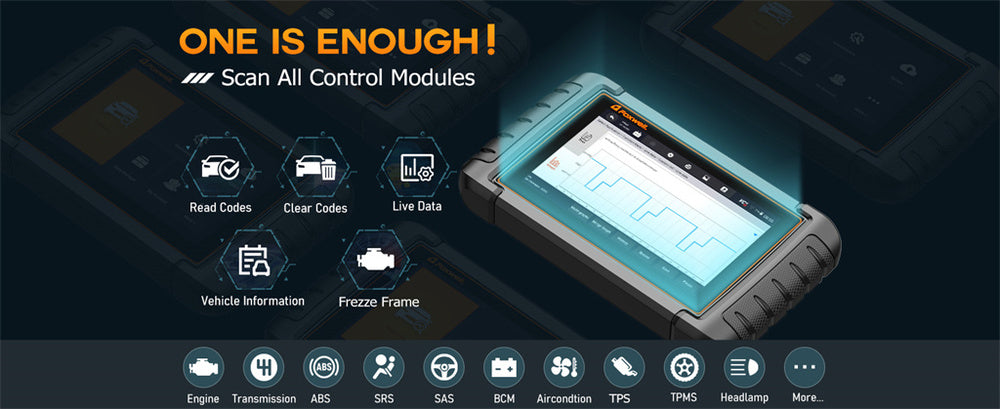
Use the right tool for the intended controller
A basic reader can be appropriate for supported emissions codes, while other modules may require enhanced coverage. Push-button start does not expand that coverage.
Verify both vehicle compatibility and the actual function needed before troubleshooting a missing menu.
Credit: www.foxwelldiag.com
Read the vehicle’s power-mode descriptions
The owner's manual should explain the available states and how pedal input affects starting. Keep those definitions at hand during the first scan. Dashboard illumination by itself may not distinguish the state accurately enough for a diagnostic procedure.
Do not assume every manufacturer uses the same sequence
This Ford push-button guide describes one application-specific set of modes and distinguishes pressing with and without the brake. It is an example, not a universal recipe. Use the manual corresponding to your own vehicle.
Accessory mode may not be the requested mode
A radio or display operating does not necessarily mean every controller needed for a scan is awake. If the scanner requests ignition on, establish what the vehicle manufacturer means by that state rather than selecting whichever mode seems convenient.
Plan the scan before changing power states
Identify whether the task is reading stored codes, viewing a stationary parameter or carrying out a specific service procedure. The required state can differ. Begin with the simplest read-only task and leave active service commands outside initial setup.
Keep the correct key available
Follow the vehicle instructions for key recognition and placement. If the vehicle reports that the key is not detected, resolve that issue through the owner's procedure. Do not bypass starting protections or use an unrelated emergency routine merely to continue a scan.
A stable session preserves evidence
Once communication works, save the initial report before clearing. Record the selected power state and whether the engine was running. Those details help explain a no-link problem or an unexpected parameter without guessing later from memory.
Do not treat an engine-off reading as a running test
Some parameters have a different meaning when the engine is stopped. Record that condition explicitly. A number captured with ignition on cannot automatically be compared with a specification that requires the engine warmed and running.
Start the engine only when the test requires it
Code retrieval often does not require an operating engine, but follow the particular tool and vehicle instructions. Running the engine adds ventilation and moving-part concerns. Do not start it simply because the scanner offers live-data gauges.
Avoid unnecessary tool purchases
If communication fails, first confirm the correct vehicle state and documented compatibility. Buying another reader before checking the power-mode instructions may leave the original issue unresolved. Conversely, repeated button presses cannot add a module function the tool does not support.
Read prompts in full
A scanner may distinguish ignition on, engine off and engine running in separate steps. Do not shorten those prompts to turn the car on. Preserve the distinction because the wrong state can invalidate a test or cause unexpected vehicle operation.
Hybrids need particular attention
A hybrid can be in a ready state even when its combustion engine is silent. Do not equate silence with an off vehicle. Follow its owner's and service instructions, and avoid improvised maintenance modes intended to force engine operation.
Choose compatible coverage first
Check the vehicle's market, model year and powertrain against the tool documentation. A diagnostic connector fitting physically is not enough. Ask specifically about the desired code-reading or data function rather than accepting a broad claim that the brand is supported.
Confirm which controller will be read
An engine emissions screen may not address a brake, restraint or hybrid-system warning. Identify the warning before scanning.
If the relevant controller is unsupported, obtain suitable equipment or professional diagnosis instead of treating a completed engine scan as a complete vehicle assessment.
Separate basic reading from service functions
The power-state guidance for an initial scan does not authorise programming, actuator operation or calibration. Such work can require additional preparation and stable power arrangements.
Use the exact procedure for those tasks rather than extending a read-only connection guide beyond its scope.
Check the complete setup requirements
Consider the tool, any adapter and the required software together.
Confirm the phone or computer compatibility if applicable.
Read whether enhanced access needs a particular product version.
Do not assume that a start button is the reason an unsupported feature is missing.
Park securely before connecting
Use a safe stationary location and the vehicle's prescribed parking arrangements. Keep the tool and cable away from controls. If the vehicle has severe symptoms or warnings requiring it to remain stopped, do not operate it merely to collect a more detailed report.
Keep unintended movement out of the setup
Follow the owner's instructions for transmission position and parking brake. Do not press a pedal as part of a guessed ignition sequence. Pedal input may change a button press from selecting a power state to starting the vehicle.
Consider the vehicle’s power condition
Long ignition-on sessions can consume battery energy. Follow the vehicle and tool guidance on session length and any required support equipment. Do not improvise a charger arrangement or ignore repeated resets that suggest the session is unstable.
Find the documented diagnostic socket
Use the owner's information when its location is unclear. Inspect the external plug and cable for damage. Avoid forcing a connection or probing pins; a supported scan requires the proper interface, not an improvised electrical shortcut.
Use reliable owner information
Toyota’s owner-manual portal is one example of selecting the exact vehicle to obtain its operating instructions. Use the equivalent resource for your make and market. The correct manual is more reliable than a button sequence copied from another model.
Connect in the prescribed order
Follow the scanner's instructions about ignition state during attachment, then use the vehicle's documented method to reach the requested state. If the two instructions appear incompatible, resolve that uncertainty through the manufacturer rather than improvising a compromise.
Confirm the state after pressing the button
Check the indicators and descriptions identified in the owner's manual. Do not infer the state only from the infotainment screen or scanner power. If the vehicle changes state unexpectedly, pause the session and determine why before interpreting further results.
Do not publish or follow a universal press count
Some vehicles distinguish accessory and ignition states differently, and instructions can change with model year. A long press may have a different purpose from a short one. Use the exact manual instead of assuming repeated presses will eventually reach the correct mode safely.
Watch for automatic state changes
Vehicles may manage electrical power or shut down a mode under specified conditions. If communication ends, record what the vehicle did. Do not assume the scanner failed without checking whether the controller's operating state changed during the session.
Save a valid first code report
Wait for completed communication, then retrieve the supported categories. Keep full codes, status labels and available freeze frame. Note whether the engine remained stopped. This creates a useful baseline without changing diagnostic memory while setup is still being established.
Interpret status categories correctly
Pending, stored and permanent reports are not interchangeable. A warning lamp and a code record may also have different retention behaviour. Keep the exact labels in the saved report so a later discussion does not turn every entry into an active component failure.
A code description does not identify the failed part
Use the vehicle-specific diagnostic procedure to distinguish possible causes. Starting-system unfamiliarity should not distract from ordinary diagnostic discipline. Once a valid report is obtained, the next step is evidence-based testing rather than replacing whatever noun appears in the description.
Do not clear codes to fix a connection problem
Erasure acts on vehicle diagnostic information, not on the physical start button or phone connection. If communication is unreliable, solve that issue first. Preserve any successful read before considering a separate, justified clearing operation.
Clear only within the repair process
The reason for clearing should come from diagnosis or verification, not a desire to restart the session. BAR’s OBD reference explains that readiness and permanent records need careful interpretation. A shorter code list is not proof of repair.
Follow the command’s required state
When an appropriate vehicle procedure calls for clearing, use the tool instructions and specified power state. Do not assume the state used for a previous live-data check is also correct for erasure. Read the confirmation and preserve the original report beforehand.
Finish the read before switching off
Save or export the results and exit the session according to the tool instructions. Avoid changing the vehicle state while a report is still being retrieved. Active programming or update procedures require their own completion and recovery rules.
Keep software information with troubleshooting notes
Record the scanner or app version when an issue repeats. Follow official updates where applicable.
An update may improve tool behaviour, but it does not replace selecting the correct vehicle mode or diagnosing a code the controller reports consistently.
Disconnect and store deliberately
Follow the product instructions for removal.
Keep the connector free of strain.
Store important reports separately from the tool.
Do not assume that leaving an adapter plugged in indefinitely is appropriate simply because its light goes out when the vehicle appears off.
Avoid the most common reasoning error
Do not collapse accessory power, ignition on and ready or running into one vague state. Describe what was actually selected and observed. This makes a support request useful and prevents a powered screen from being mistaken for successful diagnostic communication.
Do not ignore a contradictory prompt
If the tool asks for engine off while the vehicle is ready or running, pause and follow the correct procedure. Do not continue because the app appears responsive. The instruction may be essential to the validity or safety of the requested operation.
Do not repeatedly interrupt an unresolved session
Record the error and use the documented troubleshooting sequence. Repeated uncontrolled connection and power changes can obscure what failed. If a service operation was active, follow its recovery guidance rather than treating it like an ordinary read-only scan.
Make the next attempt controlled
Change one justified setup variable at a time, such as correcting the documented power mode. Keep the same supported vehicle profile. Then repeat a simple read operation and note whether the failed stage changes, so the result contributes evidence rather than another unexplained attempt.
Scan when there is a useful question
A new warning, a diagnosed repair verification or a defined data check gives the session a purpose. Repeatedly cycling the vehicle and scanning without a question adds little.
Preserve meaningful reports and avoid unnecessary erase operations between them.
Keep a short power-state log
Record the vehicle identity and tool version. Write the requested state and how the owner's manual says to select it.
Note whether the engine ran or the vehicle indicated ready.
Save the communication result.
These details make a later comparison much clearer than saying the car was on.
Credit: www.youtube.com
The correct vehicle state is the key step
Use the exact owner's manual, follow the scanner's connection instructions and verify actual communication before interpreting results. Keep read-only scanning separate from service commands.
Push-button start is manageable when its states are understood; a universal button ritual is unnecessary and can be misleading.


Automotive reference information. Confirm specifications in the manual for your exact vehicle. Original replacement guides link to their research sources. About us


