
Look for an OBD2 scanner that can demonstrate the task you need on the vehicle you own. A long feature list is less useful than a clear answer about the exact module, function and software version.
Before buying, write a short acceptance checklist: supported vehicle, required data, usable display or app, legitimate updates, understandable ownership terms and a safe connection. Treat an unanswered requirement as unresolved rather than assuming that all-system or professional means everything is included.
This checklist focuses on evidence to request before purchase. It does not rank brands or claim that a basic reader can replace a full diagnostic process.
Start with a vehicle-and-task requirement
Write the year, model, engine, market and the system you want to access. Then state the operation: read codes, save freeze-frame information, view a supported parameter or perform a documented service task. This is the requirement the seller or manufacturer must answer. A statement that the brand is supported is not specific enough.
Verify the exact vehicle in the coverage database
Autel: diagnostic vehicle and function coverage separates vehicle details, systems and functions in its coverage information. Use the equivalent resource for the product you are considering. Save the result and any relevant notes. Do not substitute a result for a different model year simply because the body shape looks the same.
Connector fit is not full-system access
A compatible connector is only part of compatibility. Generic OBD access and manufacturer-specific modules are separate questions. Ask whether the required system and operation are supported, not merely whether the plug fits. An adapter cable cannot by itself create missing software coverage.
Check the software combination
For an app-based tool, identify the exact app and supported operating system. Confirm that the hardware is supported by that app rather than assuming all adapters are interchangeable. Save the manufacturer's compatibility statement. A successful Bluetooth pairing is not proof of communication with the vehicle.
Record the required software version
If coverage depends on an update, establish which version is needed and whether the purchase includes access to it. A used tool with old software may not match the current website's feature list. Ask how the version can be checked before completing the purchase.
Do not pay for an unspecified future promise
A seller may say that more functions will be added later. Evaluate the product on confirmed present support unless a clearly documented future commitment is essential to your decision. Do not assume a missing module will become available merely because updates exist.
Replace invented testing claims with a demonstrable example
Request a demonstration or written confirmation of the actual task where practical. A reviewer saying they tried the tool is useful only when the vehicle, software and operation are identified. This article offers a checklist, not a claim that we personally tested every device.
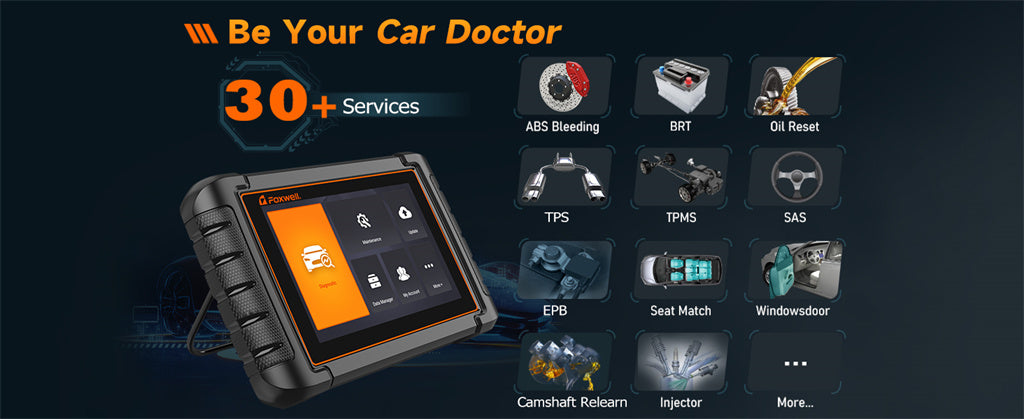
Credit: www.foxwelldiag.com
Check whether the basic workflow is understandable
A useful interface makes it clear which vehicle and module are selected and whether an action reads information or changes something. Review the manual or demonstration before purchase. An attractive screen is not enough if important distinctions are hidden behind ambiguous labels.
Can you read the display in the intended setting?
Check text size, contrast and whether important information is cut off. For a phone app, consider the device you will actually use. You should not have to guess a code character or unit. Evaluate readability while parked rather than planning to watch a screen while driving.
Can you reach the required information without guessing?
The manual should explain where supported codes, statuses and data are displayed. If a demonstration only shows an automatic repair recommendation, ask whether the underlying diagnostic information remains available. A clear reading workflow is more important than an animated dashboard.
Confirm the language of the manual and data
Check the actual supported language for menus, code descriptions and documentation. A translated sales page does not prove that the device supports that language. If a technical term is unclear, the original code should still be available for accurate reference.
Controls should distinguish reading from clearing
Look for clear confirmation before destructive actions such as clearing diagnostic information. Do not test unfamiliar resets merely to evaluate the buttons. A good purchase assessment can use the manual and safe read-only demonstrations. Understand what information would be lost before using a clearing function.
Graphs should identify units and time
A graph is useful when the parameter, units and time relationship are clear. Ask whether the data can be recorded and reviewed rather than only displayed live. A smooth-looking line is not proof of accuracy or diagnosis. The parameter's meaning still needs application context.
Make data preservation an explicit requirement
Decide whether you need screenshots, reports or exported logs. Check what the product actually saves and whether it includes the vehicle, module and code status. A report that omits those details may be less useful when discussing an intermittent problem with a repairer.
Choose a screen for the information, not size alone
A larger screen can help compare several values, but it does not add vehicle coverage. A compact reader may be sufficient for a narrow task if it shows the needed information clearly. Compare the display against your workflow rather than assuming bigger means more capable.
Check how long descriptions and values appear
Make sure long code descriptions, negative signs and decimal values are readable without ambiguity. Units should be visible. If the app requires constant scrolling to compare important data, consider whether its export or graphing functions solve that problem.
Separate diagnostic functions into individual requirements
Reading codes, clearing codes, viewing data and commanding components are distinct capabilities. A device can support one on a vehicle without supporting the others. Ask the manufacturer to confirm each required operation. Do not treat a single all-system label as an answer to every function.
Code status is part of the information
If your task involves stored, pending or permanent codes, check which statuses the tool reports and how it labels them. A simplified list may omit distinctions relevant to the investigation.
Preserve the exact codes before acting. A description naming a component is not proof that component needs replacement.
Live data needs definitions and coverage
Ask which parameters are available for the intended vehicle and whether the tool shows unsupported values clearly. A blank or fixed display is not automatically a sensor failure.
The device should help identify units and data source.
Interpretation still requires the relevant operating conditions and service information.
Select the connection method as a complete setup
Handheld, USB, Bluetooth and Wi-Fi arrangements have different requirements. Identify the hardware, software and host device together. OBDLink: MX+ documentation, software and firmware illustrates a manufacturer providing separate setup, software and firmware resources for a specific adapter. Use documentation for the exact model, not a similar-looking device.
Bluetooth compatibility must include the phone
Check the supported mobile operating system and pairing method in the manufacturer's guide. Do not assume that every Bluetooth adapter works with every phone. A product should have an identifiable support route if the documented connection fails.
Wi-Fi behavior should be documented
An adapter's Wi-Fi connection may change the phone's network behavior. Read the product and app instructions before assuming internet access is required or available through the adapter.
Do not enter arbitrary network settings from an unrelated model's tutorial.
Updates need an accessible official process
Identify where legitimate updates are obtained, what equipment they require and how the device is registered. Avoid unknown firmware packages and unofficial activation tools. A low purchase price is not useful if the required software cannot be obtained through a supported process.
Check whether updates are actually available
A download page or manufacturer support channel should identify the product rather than offer a generic file for many unrelated devices. Confirm the model and hardware revision before any firmware operation. Updating is not a substitute for missing physical compatibility.
A frequent update schedule is not coverage proof
New releases can fix issues or add functions, but the number of releases does not establish support for your task. Check the actual coverage and release information. Do not assume that a recently updated product can access every module on a recently built vehicle.
Separate included updates from paid services
Ask which updates are included and what requires renewal. Establish what stops working if a plan expires. This distinction belongs in the buying record, even when the first year is included. The separate cost guide covers comparing those charges.
Check the computer requirements before purchase
Some tools require a particular desktop operating system or connection for updates. Confirm that you have suitable equipment and permissions. A phone-compatible diagnostic app does not necessarily mean firmware can be updated from that phone.
Test the support route with a precise question
Ask whether the exact device supports the required operation on the identified vehicle. A useful response addresses that question and its limits. Save the answer. Repeated generic marketing replies leave the requirement unresolved.
Security access must be legitimate and supported
Some vehicle functions require authorized gateway access. AutoAuth: supported tools and account requirements explains supported-tool registration and directs users to the relevant tool supplier. Confirm the tool, account and service requirements before purchase. Do not treat a gateway bypass as a normal substitute for supported access.
Understand how the device is powered
A handheld reader, wireless adapter and tablet may obtain power differently. Check the manual rather than assuming every product contains a rechargeable battery. Know the permitted operating and storage conditions. A device that powers up does not prove that its vehicle communication is working.
Battery life matters only where a battery is used
For a battery-powered tablet, consider whether it can complete the intended job and how it is charged. For a vehicle-powered reader, assess cable and connector suitability instead. Compare the actual design, not a generic battery-life claim applied to every scanner.
Check replacement and charging arrangements
If a product uses a rechargeable battery, ask about supported charging equipment and service options. Do not use an arbitrary power supply because its connector fits. For replaceable cells, follow the exact specification. Keep charging requirements separate from vehicle diagnostic compatibility.
Verify the supplied power accessories
Confirm which cable or charger is included and whether it is suitable for your region. Missing equipment can add cost or prevent setup. Do not improvise wiring to power a tool through unknown vehicle terminals.
Sleep mode is a model-specific feature
Some adapters document sleep behavior; others may require removal after use. The OBDLink support page cited above describes its own model's sleep indicator.
Do not generalize that feature to all adapters. Follow the device and vehicle instructions about leaving equipment connected.

Credit: www.amazon.com
Inspect the hardware as well as the feature list
Look for intact connectors, secure cable strain relief and clearly identified parts. A damaged connector can undermine an otherwise suitable device. For a used tool, request accurate photographs and a description of any repairs. Cosmetic appearance alone does not establish electrical condition.
A rugged-looking case is not an environmental rating
Do not infer water resistance or drop protection from thick rubber or a workshop-style design. Ask for documented limits if the intended use requires them. Keep the device away from fluids and hazards according to its instructions.
Check fit and cable condition
The plug should connect through the documented procedure without force or improvised pin changes. Bent or damaged contacts need assessment. A cable should not pull on the vehicle connector or interfere with pedals. Do not accept an unsafe cable arrangement as a normal inconvenience.
Use only documented weather protection
A tool used near a vehicle can encounter rain, heat or spilled fluids. Follow the manufacturer's limits and do not leave it exposed simply because it is sold for automotive work. An unsupported environment can create both device failure and misleading diagnostic results.
Handling should support safe stationary use
Consider where the device can be placed without obstructing controls or falling into the footwell. A convenient grip does not make driver-operated live monitoring safe. Plan to use it while parked or through a properly arranged professional workflow.
Portability should not sacrifice necessary documentation
A compact reader can be easy to store, but keep its instructions and identification available. If it depends on an app or account, know how to regain supported access. A portable tool is useful only when the complete setup remains available.
Judge value after requirements are confirmed
Compare prices only among products that meet the essential task. A cheap unsupported device and a costly supported one are not equivalent choices. Nor is the most expensive model automatically appropriate. Use the requirements to explain the purchase.
Set a budget for the complete usable package
Include required software, accessories and recurring services. If you cannot verify a necessary charge, leave it as an uncertainty rather than assuming zero. Keep the budget separate from promises of avoided repair bills, which depend on actual use.
Do not pay for a feature count
Hundreds of advertised functions can include operations irrelevant to your vehicles. Identify the few functions that matter and verify them individually.
Additional capability is useful only if it is supported and you can use it safely.
Consider ownership over the intended period
Check updates, account access and support as well as first-day operation. A used-device license may not transfer automatically. A subscription may affect future use. These conditions should be understood before the purchase becomes difficult to reverse.
Reputation should lead to evidence, not replace it
A recognized manufacturer can still offer models with different limitations. Use reputation to identify products worth investigating, then check the exact model. Do not borrow a premium model's capabilities for a cheaper device in the same family.
Look for documentation that identifies the product
A clear manual, coverage resource and support contact make claims easier to check. A brand name on a marketplace listing without those resources leaves more uncertainty. Ask for the actual documentation before accepting specific diagnostic promises.
Trustworthy information states limitations
A useful supplier explains unsupported vehicles, functions and operating systems. That is more actionable than a universal compatibility claim. Read the exclusions and notes, not only the headline features. A limitation that matters to your task can decide the purchase.
Read reviews for comparable use
A positive review should identify the vehicle and operation to be relevant. A complaint may concern an unsupported task rather than a defective unit. Compare those details with official coverage. Reviews can reveal questions to ask without establishing a universal ranking.
Product age is not the whole support story
An older model may still suit a supported task, while a new one may omit a required function. Check current documentation and update availability. Do not assume that the newest device is necessary or that an old device will work forever without support.
Clarify returns, warranty and registration
Before registering or opening a package, understand the seller's return terms and the manufacturer's warranty conditions. Ask whether registration affects transfer or returns. Keep receipts and the written compatibility answer. These records make an unsuitable purchase easier to resolve.

Credit: www.amazon.com
Use the checklist as an acceptance decision
Before paying, confirm the vehicle and required operation, a readable safe workflow, supported software, legitimate updates, ownership terms and a practical return route. Leave uncertain capabilities marked unverified. For the separate ownership decision, see buying versus borrowing a scanner.
The right feature list is the one that survives these checks for your actual task. It should support better information gathering, not encourage experimental clearing, coding or parts replacement.


Automotive reference information. Confirm specifications in the manual for your exact vehicle. Original replacement guides link to their research sources. About us


