
Clear OBD2 codes only when you have a defined reason, such as the applicable repair procedure, and have saved the diagnostic information first. Use the scanner's documented erase function in the required vehicle state, then verify the result and follow the repair's confirmation procedure. Clearing does not repair the cause of a warning, and a light that stays off for a short time is not proof of a successful fix. It can also reset emissions-monitor readiness and remove information that would help diagnose an intermittent problem.
Permanent emissions-related codes have different clearing rules and cannot simply be forced away with repeated erase commands. This guide covers a responsible post-repair workflow, not a way to hide a defect before an inspection or sale. If the vehicle is running badly, overheating or displaying a serious instruction, respond to that condition before using a scanner.
Do not clear a warning merely to decide whether the car is safe to drive. The owner's manual, service information and exact scanner instructions determine the operating state and verification steps. A generic sequence of button presses is not a substitute for those requirements.
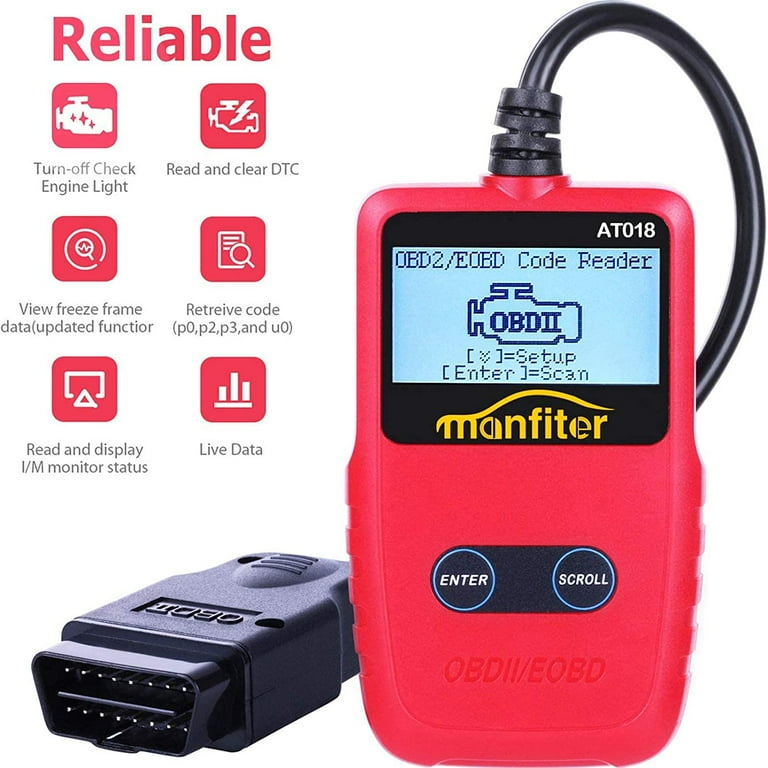
Credit: www.walmart.com
Save, repair, erase only when appropriate, then verify
Begin by saving the original report. Record the exact codes, their status, the module or diagnostic mode and any available freeze-frame information. Include the symptoms, warning behavior and recent work. A plain-language code definition by itself is not enough to reconstruct the original evidence. If a repairer will investigate the fault, ask before erasing anything. EPA: performing onboard diagnostic system checks specifically distinguishes inspection from the repair stage and emphasizes preserving diagnostic information. That distinction matters because an intermittent complaint may not return immediately after its records are removed. A clean screen created by erasing can make the next appointment less informative.
Next establish what was actually repaired or checked. A part replacement based solely on a code description does not necessarily resolve the monitored condition. The code may point to an electrical circuit, a range problem or a system performance result with several possible causes. Follow the vehicle's diagnostic procedure or obtain appropriate professional testing. If no repair has been made, ask what useful question an erase would answer and whether the loss of information is justified. Do not make repeated clearing the maintenance plan. Before a legitimate erase, read the scanner's instructions for that operation. The engine state, ignition state and connection sequence should be specified.
Some tools require the engine stopped for code clearing even though live data is used with it running. Do not assume that one state applies to every menu. KONNWEI: KW808 user manual is a manufacturer manual showing a defined erase workflow for that reader; owners of other devices should use their own model's instructions. Secure the vehicle and avoid an unnecessary running-engine session. Make sure the tool is connected reliably before selecting an action. If the cable or adapter is damaged, do not proceed. Read any confirmation message fully. The message should be understood as permission to erase supported records, not as a diagnosis or a claim that the repair is complete.
If the tool displays an error, record it rather than repeatedly sending the command. A communication failure, an unsupported operation and a code that returns after a successful erase are different outcomes. After the command completes, follow the documented sequence to read the status again. Do not infer success solely from the dashboard lamp. The scanner may report pending, confirmed or permanent entries differently, and not every category is removed by the same operation. California BAR: OBD test reference and permanent-code behavior explains that permanent diagnostic trouble codes cannot be erased simply with a scan-tool clear or battery disconnection; the onboard system must verify the relevant condition has been resolved. That means a permanent record remaining after a repair is not automatically proof that the erase button failed. It also does not mean you should ignore a continuing fault.
Interpret the record together with current codes, warning status and the appropriate verification procedure. Readiness requires separate attention. Texas DPS: readiness monitors and diagnostic codes explains that clearing diagnostic information can leave monitors incomplete. Ready indicates that a supported monitor has completed its evaluation; it is not the same as having no codes. An incomplete monitor is also not the same as a failed monitor. Save the readiness result after the repair and before any planned inspection. Do not assume that a fixed number of miles or one short drive will complete every vehicle's checks. Monitor enable conditions vary, and the applicable service guidance should be used.
Never perform an unsafe road maneuver or ignore a warning in an attempt to force readiness. If an inspection is upcoming, consult the relevant program requirements rather than treating a generic app's green icon as an official pass. The repair verification should answer whether the original complaint and monitored condition have been addressed. Depending on the fault, that may involve stationary checks, a defined operating sequence, data review or further testing. A few minutes without a lamp can be too little evidence when the monitor has not yet rerun. Conversely, a historical record may need interpretation rather than another parts replacement. Keep the before-and-after reports with the repair invoice or your service notes.
If the same code returns immediately, record its status and the conditions. If it returns only under a particular load or temperature, that context matters. Do not erase it again before the next diagnosis unless the procedure specifically requires that step and the evidence has been saved. Battery disconnection is not a better universal alternative. It can disturb settings and diagnostic information while still failing to remove permanent records. Use the proper tool and procedure for the actual task rather than treating power loss as a reset shortcut. Also separate code clearing from other reset functions.
Oil-life resets, adaptation resets, electronic parking-brake service modes and restraint-system operations are different commands. The presence of the word reset does not make them equivalent. Do not select a nearby menu because the erase function did not produce the expected result. If the scanner has manufacturer-specific capabilities, confirm exactly which module and operation are selected before proceeding. A code library entry or a menu item is not proof that the action is supported for your vehicle. When in doubt, stop at saving the report and obtain model-specific guidance. A careful erase workflow is short; the important work is the evidence preserved before it and the verification performed afterward.

Credit: www.youtube.com
Recognize what the result does and does not prove
Consider three common outcomes. First, the tool reports that clearing completed and no current code is present, but readiness is incomplete. That is not yet the same as demonstrating that the repaired system has passed its onboard check. Second, the tool reports a communication error. That tells you the operation could not be confirmed; it does not establish a stubborn mechanical fault. Third, a permanent record remains while the ordinary fault list changes. That requires understanding permanent-code behavior, not an endless loop of erase attempts. For each outcome, keep the exact wording and the original report so the next person can see what changed. If you are preparing to sell the vehicle, do not use clearing to disguise an unresolved warning.
Provide the service history and current diagnostic information honestly. If you are preparing for an emissions inspection, follow the program's requirements and allow the vehicle's legitimate verification process to occur after repair. A scanner cannot award an official pass by changing its display. If you are diagnosing an intermittent issue yourself, consider whether you have enough information before removing the record. A saved screenshot of the code alone may not retain the event conditions that would have helped later. Ask the tool manual how reports and freeze-frame data are stored, and confirm that you can reopen the file. Record the date and reason for any erase in the service notes. This helps explain a later incomplete-readiness result and prevents another person from assuming the car has never reported a fault. A useful completion note states the original condition, the repair performed, the erase operation if required and the subsequent verification result.
It should not simply say light reset. The readiness explanation helps interpret incomplete monitor labels, while the cleared-code guide explains why different records can remain available. Clear codes as one documented step in a repair process, not as a replacement for that process. When someone else performs the erase, ask them to note which controller was addressed and whether the original report was retained. This is particularly helpful when a vehicle moves between a parts-store reading, a home repair attempt and a workshop appointment. Without a timeline, the next technician may see only an incomplete monitor and no record of the earlier condition. With a timeline, the diagnostic sequence is much easier to reconstruct. The note need not be elaborate: the date, tool, operation, saved report and reason provide a practical starting point. The goal is a verified correction and preserved evidence, not an empty screen whose meaning is uncertain.


Automotive reference information. Confirm specifications in the manual for your exact vehicle. Original replacement guides link to their research sources. About us


