
To read an OBD2 scanner accurately, identify what screen you are viewing before interpreting the numbers. A fault-code list, freeze frame, readiness report and live-data display answer different questions.
Save the full report before clearing anything, including the vehicle identity, controller name and code status. The scanner reports information supplied by the vehicle; it does not automatically identify the part that needs replacement.
A useful reading turns the displayed evidence into a specific next diagnostic question while retaining the limits of the tool's coverage.

Credit: www.autonationmobileservice.com
Start with the report heading
Look for the selected vehicle, module and diagnostic mode. An engine emissions report is not the same as a scan of every controller. If the vehicle profile is wrong or the display is a saved session, even perfectly legible numbers can be interpreted in the wrong context.
Understand where the information comes from
A scanner sends supported requests and displays controller responses. Some values represent sensor inputs, others commands or calculations. The tool usually does not measure these quantities independently. That distinction explains why a plausible number cannot always verify the physical condition of the component named beside it.
Choose the question before the menu
A warning lamp calls for saving codes and their context. A drivability complaint may require relevant live data under defined conditions. An emissions inspection question concerns readiness and applicable code categories. Opening every function without an objective creates more information but may produce less understanding.
Use an example without inventing a diagnosis
Suppose a reader reports a cylinder misfire. The defensible conclusion is that the controller detected misfire-related behaviour for that cylinder under its monitoring logic. The next task is distinguishing possible causes. The report alone does not establish whether an injector, ignition part or mechanical problem caused the event.
Know the reader’s coverage
Check what the exact model supports on the identified vehicle. The Innova manual catalogue separates product models and revisions, an important reminder that a brand name does not define one fixed feature set. Use the relevant documentation rather than another scanner's menu description.
A basic reader can still provide useful evidence
Full code numbers, status and available freeze frame are valuable even without advanced functions. Save them carefully. A limited reader becomes misleading only when its results are treated as a complete inspection of systems it cannot access, such as assuming no engine codes means no brake or restraint faults.
Enhanced tools add questions, not certainty
Manufacturer-specific access can reveal additional modules and parameters. It does not remove the need for correct definitions and service procedures. A larger code list may include historical or secondary events, so the diagnosis still needs a timeline and a reasoned choice of which condition to investigate first.
Wireless and handheld reports need the same care
A phone screenshot and a handheld printout can contain equivalent diagnostic information. Check whether either output omits a status label or subcode. The transport and screen style matter less than preserving the exact result and knowing whether the selected session is live or previously recorded.
Verify the basics before interpreting
Confirm vehicle identity, connection completion and the meaning of the current menu. If the screen says unsupported or communication failed, it has not produced a valid no-fault result. Treat incomplete communication as its own problem before making conclusions about vehicle condition.
Match vehicle details to the session
Review the year, model, engine and market information requested by the tool. Automatic identification is useful but should be checked against the vehicle. A definition from the wrong application can be misleading even when the code characters are displayed correctly.
Recognise live data as a separate view
Live data changes with operating conditions and controller decisions. Record units, engine state and whether the values are actually refreshing. For detailed interpretation, use the live-data reading guide rather than treating the data screen as a list of universal pass-or-fail numbers.
Read truncated descriptions completely
Small screens may abbreviate a definition or require scrolling to show its remaining text. Save the code itself even when the description is incomplete. A missing word such as circuit or range can change how the condition is understood, so do not base a repair on a partial label.
Connect with the vehicle stationary
Follow the tool and vehicle instructions for connection and ignition state. Keep the cable away from pedals and moving parts. Read the initial report while parked; neither a handheld display nor a phone should be operated by the driver while the vehicle is moving.
Use the documented diagnostic socket
Locate the connector through the owner's information when needed. Align the plug without force and avoid probing individual pins. The aim is a supported diagnostic connection, not an improvised electrical test, and a damaged connector can make an otherwise suitable scanner appear unreliable.
Do not confuse power with communication
A lit screen may establish only that the tool receives power. Wait for identification and communication to complete. If the tool cannot reach the controller, record its error rather than repeatedly reading an empty list as proof that no faults exist.
Confirm the required operating state
Some read operations require ignition on with the engine stopped; particular data checks require a running engine. Follow the applicable instructions. Accessory mode on a push-button vehicle may not provide the same controller state as ignition on, so do not assume any illuminated dashboard means the correct mode.
Read codes with their status
Copy the complete alphanumeric code and the status exactly as shown. Stored, pending, permanent and manufacturer history categories are not interchangeable. If the tool groups categories together, inspect the detailed report or documentation before describing every entry as an active failure.
The prefix narrows the system, not the repair
Code prefixes and definitions organise diagnostic conditions, but they do not select replacement parts. Use the exact vehicle's diagnostic information for the full code. Be cautious with online lookup pages that supply a generic explanation without the manufacturer-specific conditions and test sequence.
A familiar code still needs context
The same broad fault description can have several possible causes. Ask when the fault occurred, whether related codes exist and whether the symptom matches the stored conditions. That approach is more useful than immediately searching for the cheapest part mentioned in the description.
Understand the consequences of clearing
Clearing can remove diagnostic records and reset readiness, so preserve the initial report first. It does not repair the detected condition.
California BAR’s reference also explains that permanent codes have special retention behaviour; an ordinary clear command cannot simply make them disappear on demand.
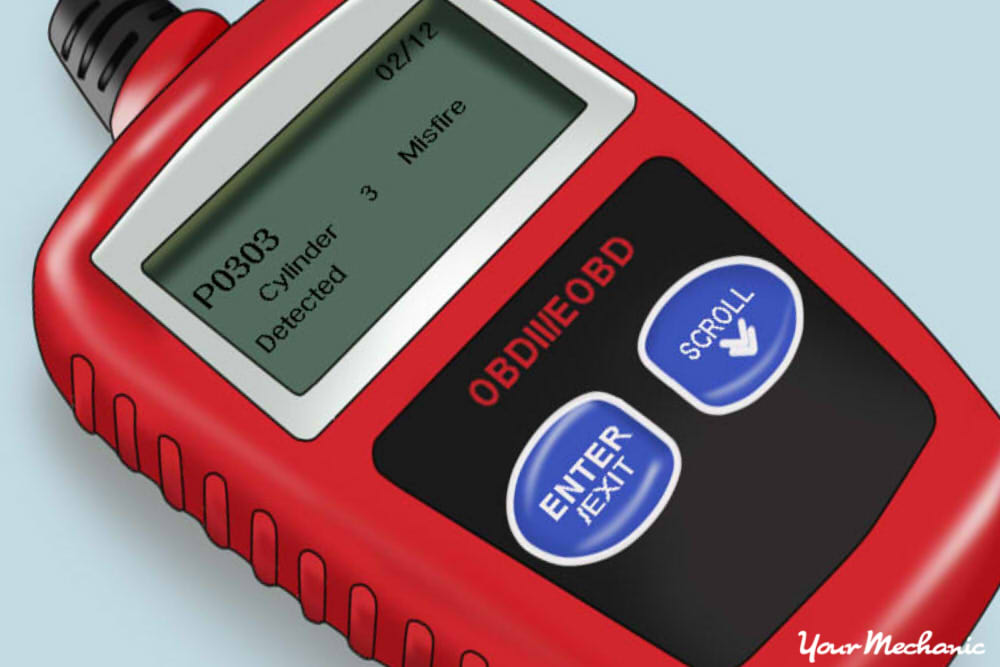
Credit: www.yourmechanic.com
Use graphs to answer a timing question
A graph can reveal how supported values change together, but sampling delays and display scale affect the apparent relationship. Save the parameter names and units with the graph. Two lines crossing on an automatically scaled display do not necessarily represent equal physical values.
Compare equivalent operating conditions
A warmed engine at steady idle and a cold engine immediately after starting are different tests. Record temperature, speed and relevant loads. If you compare captures, repeat a safe, defined condition so an ordinary operating difference is not mislabelled as component deterioration.
Avoid turning fuel-trim direction into a parts verdict
A mixture correction shows how the controller is responding within its operating strategy. It does not identify one failed component by itself. Check whether the system is in the relevant control mode and use service information to decide which related evidence is needed next.
Separate unsupported from abnormal
The OBD Auto Doctor supported-parameter reference distinguishes many standard fields and explains that availability depends on the vehicle. A blank or absent parameter may be unsupported. Establish support and units before treating the displayed value as evidence of a sensor fault.
When the report seems inconsistent
Check for an old recording, a wrong vehicle profile, incomplete communication or mixed code categories. These explanations should be considered before assuming the controller is contradicting itself. Preserve screenshots of the discrepancy so support or a technician can see the exact context.
Handle connection failures as connection failures
Follow the manual's checks for ignition state, connector seating and compatible vehicle selection. Stop before improvising pin bridges or bypassing protections. A no-link message is not a diagnostic code and should not be translated into a claim that a particular module has failed.
Interpret error messages literally
An unavailable definition means the tool lacks a readable description, not necessarily that the code is invalid. An unsupported function means the requested operation was not provided. Keep the code or message intact and obtain the matching documentation rather than filling the gap with a guessed explanation.
Use software versions as part of the record
Updates can change coverage, labels or report format. Note the version when a problem is repeatable. Install updates through the manufacturer's process, but do not assume an update is a repair for a vehicle code that the controller continues to report correctly.

Credit: www.youtube.com
Build a short diagnostic record
A useful note contains the complaint, vehicle identity, date, warning behaviour, complete codes and relevant captured conditions. Add what happened immediately before the complaint without asserting causation. This separates observation from theory and makes a later professional assessment more efficient.
Use repeated scans purposefully
A follow-up scan can check whether the same condition is reported after a documented repair or under the original symptom conditions. Repeatedly scanning without a question adds little. Keep each result separately so a change in status or readiness can be traced rather than overwritten.
Retain original files
Store exported reports where they can be reopened without the scanner. Confirm that the file contains the vehicle and code details, not just a cover page. Protect personal identifiers when sharing publicly, while preserving a complete private copy for the repair process.
Know when reading is not enough
Fuel leaks, severe misfiring, brake warnings and restraint warnings require the response specified for the vehicle. Do not prolong operation solely to collect more data. A scan can help explain a concern, but it does not override immediate symptoms or the need for qualified inspection.
Finish with an evidence-based next step
The right interpretation states what the tool actually found, which system was checked and what remains unproven. It then identifies the next appropriate test or repair verification.
Reading an OBD2 scanner well means preserving those distinctions, not converting every code into a confident but unsupported parts recommendation.


Automotive reference information. Confirm specifications in the manual for your exact vehicle. Original replacement guides link to their research sources. About us


