
To use an Autel OBD2 scanner, identify its exact model, check the vehicle coverage, connect it as its manual directs and read the stored information before choosing any erase or service function. Autel sells different tools with different capabilities.
Instructions for a small AutoLink reader are not interchangeable with instructions for a MaxiSys tablet. Start with the read-only functions and save what they show.
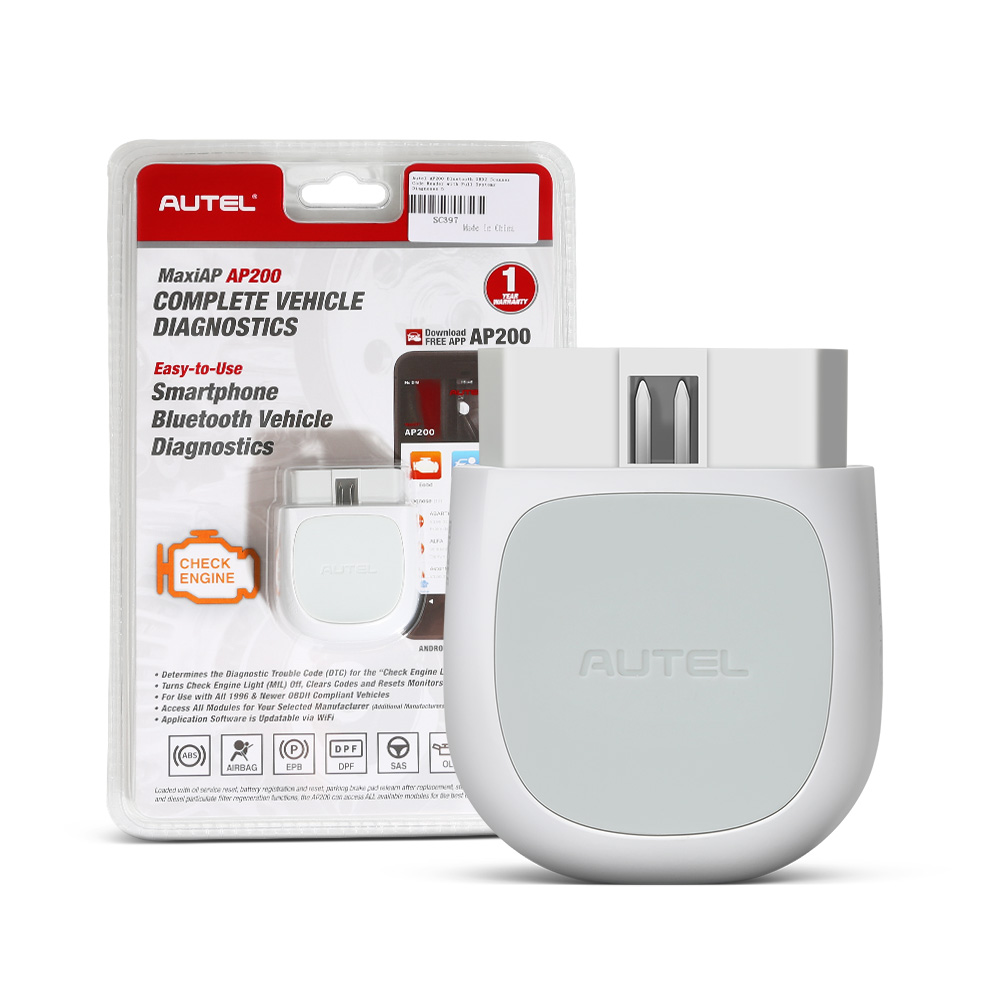
This guide uses the AL319 owner's manual as one documented example, while explaining the decisions that apply when your model has different menus. It does not claim that every Autel product can diagnose every vehicle system.
Credit: www.obdii365.com
Identify your scanner before choosing a menu
Read the model marking on the tool, not just the brand on its case. Record the software version and whether a separate vehicle communication interface is involved. A seller's description may combine features from several products, so use the matching manual to establish what your particular hardware and software can actually do.
Define the question you want answered
A check-engine light, an ABS warning and a maintenance reminder are different tasks. Write down which lamp or symptom brought you to the scanner. That prevents a successful engine-code read from being mistaken for a full inspection of brakes, airbags, transmission controls or other modules that your reader may not support.
Verify the vehicle and function together
Search Autel's coverage information using the year, model, engine and required operation. Vehicle recognition alone is not confirmation that every service function is available. If a function matters, verify that function specifically rather than relying on a broad statement that the brand is covered.
Separate generic and enhanced access
The generic OBD menu concerns supported emissions information. Enhanced diagnostics may access additional modules, but coverage still varies. Choose the appropriate path deliberately. If the engine menu has no codes while an airbag lamp remains illuminated, the correct next step is checking SRS coverage, not declaring the car fault-free.
Treat a recommendation as a lead
A code description or suggested repair is useful for deciding what to investigate. It is not evidence that the named part has failed. Compare the code with its setting conditions and the vehicle's diagnostic procedure before buying components. An electrical connection, supply problem or mechanical fault can produce misleading symptoms.
Know what your purchase includes
For a tablet or connected tool, check registration, update access and any required vehicle software before a difficult repair begins. Do not assume that an account login, a subscription or an adapter is included because another Autel product has it. Preserve the purchase details and model information for support.
Keep the correct support record
Save the manual and support contact for the exact model. When asking for help, include the vehicle, software version and message shown on screen. A precise report is more useful than saying that an Autel will not work, especially when the problem affects only one module or a particular operation.
Prepare the equipment and work area
Work in a safe parked location with the vehicle secured. Inspect the cable, plug and tool housing for damage. Route the cable away from pedals and moving parts. If later testing requires a running engine, arrange ventilation and keep people, clothing and tools clear of belts, fans and hot surfaces.
Inspect the connector before plugging in
Look for bent pins, contamination and a damaged connector shell. Do not force a plug that will not align. Remove an existing accessory only according to its instructions and keep track of it. A poor connector fit can interrupt communication and should be resolved before interpreting an incomplete scan as a vehicle failure.
Check how this model receives power
The AL319 receives external power from the vehicle, while some other Autel products use a rechargeable tablet and a separate interface. Follow your model's power requirements. A screen that turns on proves only that some power is present; it does not confirm a healthy vehicle battery or a reliable communication connection.
Connect using the documented ignition sequence
Use the connection sequence in your scanner and vehicle instructions. Do not generalize a key-on step from one tool to every product. After connecting, select the required ignition state without starting the engine unless the intended test requires it. Keep the key or start-button operation consistent with the vehicle's manual.
Locate the correct diagnostic connector
Use the owner's information to find the diagnostic socket rather than pulling trim or guessing at a nearby electrical connector. The plug shape should match without modification. If an adapter is required for a special application, verify that both the adapter and the software support that vehicle and task.
Keep the connection stable
Seat the plug securely and leave enough cable slack to avoid pulling on it. Do not hold the cable under tension while operating the tool. If communication repeatedly drops when the cable moves, stop and inspect the equipment instead of repeatedly clearing codes or restarting the vehicle to hide the symptom.
Read the interface before making changes
Find the navigation, confirm and back controls. Notice whether a highlighted option reads information or writes a change. Reading codes and viewing supported data are different from erasing information, commanding an actuator or initiating a relearn. If a label is unclear, consult the manual before confirming it.
Choose the intended diagnostic path
A tablet may offer vehicle-specific diagnostics alongside generic OBD. An AL319 presents a simpler reader workflow. Avoid selecting a nearby vehicle because the correct model is missing. Incorrect vehicle identification can give inappropriate descriptions or procedures, making the resulting screen less trustworthy even if some data appears.
Save the identification details
Where supported, record the VIN and module identification reported by the tool. Compare them with the vehicle you are testing and investigate a mismatch. Save the date, mileage and symptom with the scan. These details help distinguish a new finding from information retained after earlier repairs or module replacement.
Begin with a read-only baseline
Read the available stored and pending codes before changing anything. Note the module, exact alphanumeric code and status rather than writing only the text description. Photograph or export screens where possible. A complete baseline gives a technician a better starting point and helps you compare results after a confirmed repair.
Preserve evidence before considering erase
Record freeze-frame information and readiness along with the codes. Clearing can remove useful context and reset monitors, while it does not repair the condition that produced the fault.
If you have not established the cause, leave the evidence intact. The disappearance of a warning immediately after clearing is not a successful repair test.
Interpret live data in context
Select a small group of relevant parameters rather than watching every value at once. Record units and whether the engine is cold, warm, idling or under a documented test condition.
A value without its operating context is easy to misread. Compare it with the applicable service information rather than a universal internet normal range.

Credit: www.youtube.com
Understand the boundary of advanced functions
Some Autel tools provide active tests and service operations; others do not. Availability does not make an operation appropriate. Read the prerequisites and consequences before proceeding, including battery support, mechanical preparation and the need for a follow-up procedure. Do not experiment with a function merely to see what it does.
Treat active tests as controlled procedures
A command may move an actuator or change engine behavior. Check the service procedure first. Make the work area safe.
Keep bystanders informed and clear. Use the exact vehicle selection.
Stop if the response differs from the instructions. A component reacting to a command is one piece of evidence, not proof of its performance under every load.
Use service resets only after the service
A reset is not a substitute for replacing fluid, repairing a system or completing an inspection. Confirm the prerequisite work.
Confirm that the selected function applies to this vehicle. Read each prompt fully.
Save any initial values required by the procedure.
If an operation fails, record the message instead of repeating it blindly or switching to another model profile.
Update from the correct official channel
Use the update method specified for the exact product. A downloaded file with a similar model name is not an acceptable substitute. Read any release notes and keep a record of the installed version. Updates can change coverage or address faults, but they do not guarantee that a missing vehicle function will become available.
Protect an update from interruption
Follow the manual's requirements for power, cable connection and computer or network setup. Do not unplug the tool because an update appears slow without first checking its instructions.
If it fails, save the error and contact support. Repeatedly trying unrelated firmware creates a larger problem than a missing diagnostic feature.
Recheck coverage after updating
Verify the version installed successfully. Reopen the intended vehicle selection.
Confirm that the required function appears. Check any new prerequisite notes.
Do not assume a renamed menu has identical behavior.
If the update changes how data is presented, compare units and labels before interpreting differences as a change in the vehicle itself.
Diagnose connection trouble methodically
First distinguish a tool that will not power up from one that powers up but cannot communicate. These are different failure paths. Check the model instructions, ignition state, vehicle selection and connection before suspecting a control module. Keep a record of whether the same tool communicates with other supported vehicles.
Investigate no communication without shorting pins
Inspect the socket visually. Check the relevant fuse using the vehicle's diagram.
Avoid bridging diagnostic pins with wire or applying external power to an unidentified terminal. If the power supply or network needs electrical testing, use the proper circuit information and equipment.
A powered reader with no response does not identify the failed component by itself.
Record the exact error instead of guessing
Write the message word for word. Note when it appears.
Record whether the engine was off or running. Identify the selected module and function.
Save the software version.
These details help distinguish coverage limitations, connection faults and genuine vehicle problems without turning every unsuccessful operation into a recommendation to replace the scanner.
Make each scan answer a defined question
For an intermittent complaint, record when the symptom happens and what conditions differ when it does not. A scan performed after the symptom disappears may still be useful, but it has limits. Combine electronic evidence with the manufacturer's diagnostic steps and physical checks instead of treating the tool as an automatic repair decision.
Keep useful records between visits
Store the before-repair scan and the repair invoice together. If a warning returns, compare the code, status and operating circumstances rather than assuming the original repair failed. A new code in the same system may reflect a different cause. Good records reduce repeated work and help explain what has already been tested.
Verify the outcome without making inspection promises
After the documented repair and verification procedure, review supported monitors and any returning codes. California BAR distinguishes readiness and permanent codes in its inspection guidance. Local rules vary. A reader's green indicator is not a guarantee of passing an official inspection or proof that every vehicle system is healthy.

Credit: www.amazon.com
A useful first session ends with evidence
A successful first Autel session produces accurate identification, saved diagnostic information and a clear next step. It does not need to end with cleared codes.
If coverage or instructions remain uncertain, stop at reading and documenting the available information. That protects evidence while you obtain the correct service procedure or qualified diagnostic help.


Automotive reference information. Confirm specifications in the manual for your exact vehicle. Original replacement guides link to their research sources. About us


