
Use a Cen-Tech OBD2 scanner by first matching its item number to the correct Harbor Freight manual, then following that model's connection and read-code procedure. The Cen-Tech name alone does not establish which menus, buttons or data functions the tool has.
Save the initial report before selecting an erase command. A basic reader can provide useful diagnostic evidence, but it cannot confirm a failed part simply by displaying a code.
This guide focuses on identifying the correct instructions and turning the first scan into a reliable record rather than guessing a universal sequence for every Cen-Tech unit.
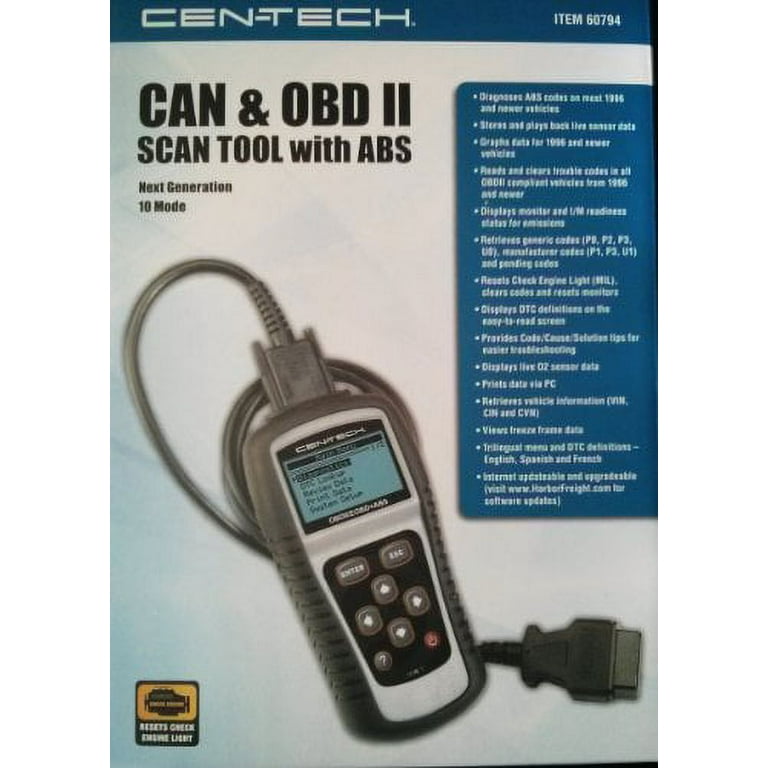
Credit: www.walmart.com
Identify the exact reader
Read the item number and any revision information on the housing or packaging. Keep a photograph of the label with the manual.
Different readers can share a brand while offering different features.
Do not assume instructions for a professional scan tool apply to a smaller code reader merely because both display the same logo.
Use Harbor Freight’s manual route
Harbor Freight’s owner-manual guidance directs owners to the product listing and warns that multiple manuals may be available. It recommends matching the order information, packaging or item number.
Follow that route rather than trusting a downloaded document whose cover does not identify your tool or whose instructions describe buttons it does not have.
Know what the first scan should achieve
The initial objective is to retrieve a complete report from a supported controller and preserve it. That means recording code numbers, status and available context.
It does not mean clearing the lamp, testing every menu or buying the first component named in a short description.
Check features in the matching manual
Look for the documented functions you actually need, such as reading codes, readiness or live data. Do not infer a feature from another Cen-Tech model's product page.
An absent function is a coverage limit, not a reason to improvise a button combination or install software intended for a different item number.
Reading is easier than diagnosing
Operating a reader's buttons may be straightforward, but interpreting a fault requires vehicle information and a test plan.
Keep those skills separate.
If the report points toward a safety-critical system or the vehicle has severe symptoms, obtaining professional diagnosis is more appropriate than experimenting because the scanner was easy to connect.
Use the reader to reduce uncertainty
A complete scan can narrow the system involved and preserve a fault that may be intermittent. It cannot eliminate every possible cause by itself. The useful benefit is a better next question, such as which circuit test distinguishes a wiring fault from a component problem.
Make a stationary workspace
Park safely and keep the scanner cable away from pedals and steering controls. Have a way to save the results before starting. A small display is easier to misread when rushed, so allow time to scroll through the complete report and any shortened descriptions.
Avoid parts spending based on a label
A code describing sensor behaviour can have causes beyond the sensor. Before purchasing parts, use the vehicle-specific diagnostic procedure or ask a technician what test confirms the recommendation. The cost of a reader is not recovered by replacing unverified parts more quickly.
Keep a record you can explain
Write the complaint, operating conditions and exact result together. If the engine runs normally despite a warning, record that without calling the warning harmless. If the symptom appears only when cold, preserve that distinction rather than treating a later warm scan as the whole story.
Do not use a clear screen as a safety certificate
A basic emissions reader may not access ABS, airbags or other manufacturer modules. It can also miss a condition that has not met a monitor's criteria. Follow vehicle warnings and symptoms independently of the reader's apparent reassurance, especially when its actual coverage is limited.
Ask for help using precise information
If you need support, provide the Cen-Tech item number, vehicle details and exact error or code. Include the step at which the problem occurred.
This is more useful than saying it does not work and avoids a support conversation based on the wrong model's features.
Prepare the vehicle according to both manuals
Use the vehicle instructions for its operating state and the scanner instructions for connection. Confirm whether the relevant check requires ignition on with the engine stopped or a running engine. Do not assume the same state applies to every function simply because the display remains powered.
Locate the diagnostic connector
Consult the owner's information when the connector location is unclear. Inspect the external socket and plug without probing pins. Avoid pulling on wiring or forcing the connector into place. A damaged or poorly seated connection can make a supported tool appear unable to communicate.
Use the documented ignition sequence
Follow the exact model's instruction about when to plug in and change ignition state. Generic online sequences may conflict with the tool manual. If the vehicle has push-button start, identify its ignition-on mode through the owner's manual rather than assuming accessory mode is sufficient.
Connect gently and keep the lead clear
Align the connector correctly and seat it without excessive force. Arrange the cable before starting a session. If the plug or cable is damaged, stop and obtain the appropriate repair or replacement instead of holding it at an angle to maintain intermittent contact.
Confirm power and communication separately
A lit screen is not yet a completed scan. Wait for the tool's documented communication process and vehicle identification.
If it reports a linking error, preserve that message and troubleshoot the connection rather than interpreting an empty code display as a valid no-fault result.
Select the intended diagnostic function
Begin with the read-only code or status function documented for the item number. Avoid erase, actuator or service commands while gathering evidence.
If a menu label is unfamiliar, consult its explanation before selecting it.
Similar words can refer to different operations on different tools.
Learn the display before judging the result
Find out how the tool marks pending, stored and other available categories. Check whether descriptions scroll or are abbreviated. Save the code itself even if the text is incomplete, because the exact characters can be looked up later in the proper vehicle reference.
Keep settings and vehicle commands separate
Language, units and audible notifications concern the reader's presentation. Clearing codes concerns retained vehicle information.
Do not select a reset function simply because you want a cleaner display. Understand which system the operation changes and preserve the existing result before any destructive action.
Read the complete list
Scroll through all retrieved entries and record their status. Note the controller or diagnostic mode if shown.
Several codes may be related, so saving only the first can distort the picture.
Do not assume that the first displayed code is automatically the root cause.
Use the correct definition source
Match the full code to the identified vehicle and system. A generic description may explain a broad condition but omit manufacturer-specific test criteria. If the reader has no definition, that is a documentation limitation; keep the code and obtain an authoritative interpretation rather than guessing from a similar number.
Do not confuse a code with a replacement instruction
The controller reports what it detected, which may involve a circuit or a measured relationship. A test is still needed to distinguish the possible causes. Ask what evidence confirms a component failure before buying it, especially when wiring, supply or mechanical conditions can create the same broad complaint.
Preserve evidence before an intended erase
Save the original code list and available freeze frame. Record the symptom and any repair already performed. Clearing can remove useful context and change readiness, so it should follow a defined diagnostic or verification step rather than be the first response to a warning light.
Use the documented erase procedure only when justified
Check exactly which information the command affects. Follow the model instructions and required vehicle state. Do not substitute battery disconnection or fuse removal if the command is unavailable. A tool's inability to clear a category is not permission to bypass the vehicle's retention rules.
Verify more than an empty list
After an appropriate repair and clearing step, follow the vehicle's verification procedure. Check whether the original symptom recurs.
Review current codes and relevant monitor status.
A brief idle with no warning is not proof that an intermittent problem is resolved or that the vehicle is ready for every inspection.
Understand permanent-code limitations
BAR’s OBD reference explains that permanent codes are not removed through ordinary scan-tool clearing or battery disconnection.
The controller must establish the required repair-verification conditions.
Keep the retained category identified in your notes.
Interpret a retained permanent entry alongside current evidence instead of repeatedly selecting erase and assuming the reader is broken.
Use live data only if this model supports it
The presence of a data function on another Cen-Tech scanner does not establish it on yours. If supported, select a few relevant parameters and record operating conditions.
A slowly updating display may reflect the requested data set, so confirm that values are fresh before diagnosing a sensor from a frozen-looking number.
Match the parameter to its definition
OBD Auto Doctor’s parameter reference distinguishes standard data fields and explains vehicle-dependent support. A missing field is not a measured zero.
Check units and the full label before comparing readings, particularly when abbreviations make calculated load, throttle position or pressure fields easy to confuse.
Keep freeze frame separate from live data
Freeze frame records conditions associated with a detected event when available. It is not necessarily the vehicle's present operating state.
Save it with the code report and label it clearly so a historical engine speed or temperature is not later described as a current abnormal reading.
Maintain the tool according to its instructions
Store the reader and cable without strain, protect the display and follow the prescribed cleaning method. Do not open the housing to attempt an undocumented reset. Physical damage and moisture exposure require appropriate service rather than repeated connection attempts on a vehicle.
Verify update support for the item number
Some tools have an update process and others may not. Use Harbor Freight's current model-specific information before downloading anything. A file offered for a similar reader is not sufficient evidence of compatibility, and an unavailable old link should lead to support rather than unofficial firmware experimentation.
Troubleshoot one failure at a time
Check the documented vehicle coverage, ignition state and connector seating before assuming a tool or module failure. Record the exact message. For interpretation after a successful scan, see how to read an OBD2 report; communication troubleshooting and code diagnosis are separate tasks.

Credit: www.youtube.com

Credit: www.harborfreight.com
A good Cen-Tech scan is identified and preserved
Match the item number, follow its manual and save a complete read-only result. Use that evidence to choose the next diagnostic test.
Avoid universal menu claims and do not treat erasure as repair; the reader is most useful when its actual capabilities and limitations remain clear.


Automotive reference information. Confirm specifications in the manual for your exact vehicle. Original replacement guides link to their research sources. About us


