
To use an ELM327-labelled OBD2 adapter, identify the actual adapter model, connection type and supported application before connecting to the vehicle. ELM327 is the name of an interpreter design, not a guarantee that every product using the label has identical hardware, software or coverage.
The complete setup includes the adapter, its transport, the app and the vehicle's supported functions. Establish those pieces, make a read-only connection and save the original report.
Avoid generic pairing codes, firmware files and raw commands offered as universal solutions for every device carrying the same label.

Credit: www.amazon.com
What the ELM327 name describes
Elm Electronics’ datasheet describes an interpreter bridging vehicle diagnostic communication and a serial interface. A consumer adapter adds its own physical design and connection method. An application then supplies the user interface and diagnostic workflow.
Why similarly labelled adapters can differ
The label does not identify one finished product with one manual. Read the manufacturer and model information on the actual unit. Similar cases or online photographs are not enough to establish identical capabilities or instructions.
Choose a specific diagnostic objective
Begin with a supported engine-code report or a defined data question. This makes success measurable. Exploring every available app menu before confirming compatibility can confuse missing coverage with a connection failure.
Understand the request-and-response chain
The application requests data through the adapter and displays the vehicle's reply. A successful link to the adapter is only part of that chain. Confirm that the intended controller actually responded.
Keep failures assigned to the correct stage
Power, phone detection, adapter recognition and vehicle communication are separate checkpoints. Record the first failed stage. Resetting unrelated settings can obscure the problem instead of solving it.
Use an app that supports the identified hardware
Check the developer's adapter and operating-system guidance. An app's popularity does not establish support for every ELM327-labelled device. Confirm the transport and required vehicle function before purchasing additional software access.
Features belong to the complete combination
A chip or adapter claim does not guarantee a finished application's features. Verify code categories, recording and manufacturer coverage separately. Keep that verified list with the model information.
Phone compatibility depends on transport
Conventional Bluetooth, BLE, Wi-Fi and USB are different connection routes. Select the one documented for the unit. A phone supporting Bluetooth generally does not prove compatibility with every diagnostic Bluetooth arrangement.
Vehicle coverage needs its own check
Confirm the vehicle type, market and diagnostic system. A familiar connector alone is insufficient. The adapter and app must support the requested communication and function on that application.
The app supplies the menus
Do not expect a universal ELM327 menu layout. Labels and available functions come from the selected software and version. Follow that application's instructions while keeping the hardware limitations in mind.
Live data is not an independent measurement
The scanner displays controller-reported values. Some are inputs, others commands or calculations. A plausible gauge cannot independently prove that the named physical component operates correctly.
Save complete fault information
Retain full codes, status categories and module identity. A shortened description alone may omit important context. Preserve the initial report before any clearing or reset operation.
Check what recording actually saves
Confirm that exports include parameter names, units and timing where needed. Open a test file before relying on a long capture. A colourful dashboard is not necessarily a usable diagnostic record.
Evaluate the cost of a working setup
Include software and required coverage rather than comparing adapter prices alone. An inexpensive incompatible device is not a substitute for a verified tool. Match the purchase to the information you need.
Avoid arbitrary custom commands
A terminal interface can expose operations beyond ordinary reading. Do not paste unknown command sequences into a connected vehicle. Use documented application functions and the appropriate service procedure for the actual task.
Use the adapter as an evidence tool
Its useful output is a traceable report or recording. It does not guarantee a repair or identify every fault. Judge the session by whether it answers the original diagnostic question.
Make the first connection simple
Park safely, use a supported vehicle profile and begin with identification or code reading. Leave optional dashboards and custom settings for later. A simple baseline makes troubleshooting easier.
Do not replace parts from app suggestions alone
A fault description or suggested fix is a starting point. Ask what test confirms the cause. Several conditions can produce similar reports, so a parts list is not a diagnosis.
Record operating conditions with data
A value captured at cold start cannot automatically be compared with a warm-idle example. Keep engine state, units and symptom timing together. Context makes the number interpretable.
Do not assume portability means universal support
Moving the adapter between phones or vehicles can require different settings and coverage. Review the selected profile each time. A previous successful scan does not verify every new combination.
Keep safety decisions independent of a blank report
A limited reader cannot certify the vehicle safe. Follow warning instructions and physical symptoms. A tool that cannot reach a safety module has provided no reassurance about that system.
Emissions information is not an inspection certificate
Readiness and codes can inform an inspection question, but official requirements vary. Do not claim that one app screen guarantees a pass. Preserve the report and check the applicable rules.
Identify the actual diagnostic system
Use vehicle information rather than a universal model-year assumption across every country. Market and vehicle class matter.
A connector shape is a useful clue, not a complete system identification.
Regional claims need qualification
A product's coverage statement may describe vehicles sold in a particular market. Check that scope. Do not extend a North American compatibility claim to every imported or differently certified application without confirmation.
Manufacturer modules need explicit coverage
Generic engine access does not imply ABS, restraint or transmission access. Ask specifically about the module required. An unsupported result should remain labelled unsupported rather than being reported as no faults.
Hybrids and electric vehicles need exact support
Do not infer all-system compatibility from an OBD-style connector. Confirm the powertrain and desired controller function. Avoid high-voltage work or undocumented service modes while trying to establish ordinary diagnostic access.
Recognise the boundary of a basic adapter
Some tasks require different equipment, software or authorised access. Repeatedly changing connection settings cannot add a missing capability. Obtain a documented tool or qualified diagnosis when the required function is outside coverage.
Prepare identification and instructions
Record adapter model, transport and app version. Obtain the vehicle's connection and operating-state guidance. Keep these details available so a failed session can be described accurately rather than reconstructed from memory.
Choose documented hardware
Prefer an identifiable product with clear support information over a device whose only specification is ELM327. The interpreter name does not provide a manufacturer warranty, update source or exact radio configuration for an unknown adapter.
Install software from its recognised source
Use the developer's official distribution route. Avoid unknown downloads presented as essential fixes. Review connection permissions in the context of the supported app rather than disabling broad device protections.
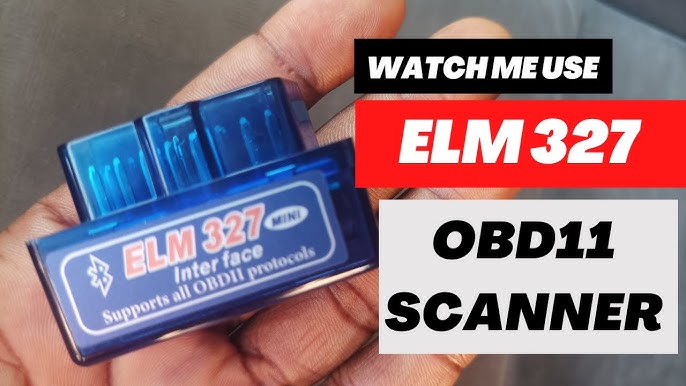
Credit: www.youtube.com
Follow the required connection sequence
Use both the vehicle and adapter instructions for ignition state and attachment. Do not force the connector. Keep the adapter and any lead clear of pedals and controls.
Locate the proper diagnostic socket
Consult the owner's information if it is unclear. Do not attach to a similar service connector or probe individual pins. A read-only scan requires a correct interface, not an improvised electrical experiment.
Select Bluetooth, BLE or Wi-Fi accurately
Use the transport printed in the model documentation. Do not select whichever option first appears in the app. A wrong transport can prevent discovery even when the hardware is powered and functioning.
For Wi-Fi, separate network join from app setup
Car Scanner’s Wi-Fi guide requires joining the adapter network and matching its documented address and port. That is not the same process as Bluetooth pairing. Use the settings for the actual adapter.
For iOS BLE, follow the supported app method
Car Scanner’s BLE instructions describe its in-app connection workflow rather than ordinary system pairing. Apply that guidance only to a compatible BLE adapter. Do not generalise it to unrelated transports or applications.
Confirm actual ECU communication
Wait for a completed vehicle response before interpreting a blank report. A phone connected to the adapter can still have no vehicle link. Keep those status messages separate in your notes.
Read the full diagnostic result
Save every relevant entry and its status. If a definition is missing, retain the code. Consult the exact vehicle reference rather than replacing it with a guessed meaning from a similar number.
Use code descriptions as test directions
A circuit or performance description narrows the investigation. It does not prove the named part is defective. Identify the appropriate follow-up test before buying components.
Do not erase the first evidence
Clearing can remove records needed to understand an intermittent fault. Save the initial report and available freeze frame first. A command should have a defined diagnostic purpose, not merely make the screen look normal.
Troubleshoot connection errors methodically
Record the error and the last successful communication stage. Check documented compatibility and power state before changing advanced settings. A no-link message is not a vehicle fault code.
When the adapter is visible but the car is not
Review the selected vehicle and required ignition mode. Check the connector without probing pins.
Follow the documented retry process.
If the issue remains, obtain support rather than assuming a failed ECU.
When changing apps, establish a new baseline
Confirm that the new app supports the adapter.
Select its correct transport.
Review the vehicle profile.
Save a fresh read-only result before comparing it with the old application's report, because labels and coverage can differ.
Maintain the actual product, not the label
Follow the adapter manufacturer's care instructions. ELM327 documentation for the interpreter is not a complete consumer-product maintenance manual. Do not open an unidentified unit to improvise a reset.
Keep the connector clean without damaging it
Use the documented cleaning method and avoid introducing liquids into contacts. Inspect obvious damage before use. A contaminated or damaged connector should be addressed appropriately rather than forced into the vehicle socket.
Store it without strain or heat exposure
Protect the device and any cable according to its instructions. Keep important diagnostic reports elsewhere as well. Losing the adapter should not mean losing the only record of an intermittent vehicle fault.
Treat firmware as model-specific
Do not install firmware intended for a visually similar adapter. Verify the manufacturer, exact model and official update route. If those cannot be established, do not experiment with files advertised as universal ELM327 upgrades.
Do not assume permanent attachment is appropriate
Follow vehicle and adapter guidance on leaving it connected. A sleep claim does not establish suitability in every circumstance. Consider the documented power behaviour and remove the device when the instructions require it.
Verify function with a meaningful read
After setup or a supported update, repeat a simple read-only operation on the intended vehicle. Record what works. Avoid erase commands or active tests merely to demonstrate that the adapter can send something.
Keep app and adapter versions in support notes
Versions help explain changes in behaviour or labels. Include the vehicle and exact failed step. This is more useful than a generic complaint that ELM327 does not work.
Advanced diagnosis needs an appropriate procedure
A basic connection guide does not authorise actuator commands, coding or security bypasses. Those tasks require exact coverage and service information. Stay within reading until the diagnostic plan justifies anything more.
Choose a focused data set
Select parameters that answer one question and preserve timing and units. Too many channels can complicate interpretation. Use a controlled capture rather than expecting a broad dashboard to reveal every possible issue.
Check gauge definitions
OBD Auto Doctor’s reference distinguishes standard parameters and vehicle-dependent support. An absent field is not a measured zero. Match the full definition before comparing values or declaring a sensor abnormal.
Keep freeze frame labelled as history
A stored snapshot describes a captured event rather than present operation. Save it with the relevant code. Do not compare it with live values without accounting for the different conditions.
Enhanced coverage is a separate claim
A custom profile may expose additional data only when the complete setup supports it. Verify the source and applicability of that profile. Do not use unknown commands as a substitute for documented manufacturer access.
Share evidence with its limitations
Include the tool, app, vehicle, parameter names and conditions when sharing a log. Remove personal details from public copies. Keep the complete original privately so the diagnostic context remains available.

Credit: www.amazon.com
A reliable ELM327 setup is fully identified
Match the real adapter, transport, application and vehicle function, then preserve a read-only result. The interpreter label alone cannot promise universal pairing, coverage or firmware compatibility.
For interpretation after connection, use the OBD2 report guide.


Automotive reference information. Confirm specifications in the manual for your exact vehicle. Original replacement guides link to their research sources. About us


