
The Autel MS309 is a compact code reader for supported OBD-II emissions diagnostics. Start by reading and recording its results, not by choosing Erase Codes.
A trouble-code definition identifies a detected condition; it does not establish which part needs replacement. The useful first session ends with an accurate record of the codes, their status and any available freeze-frame information.
This guide is about collecting that record and knowing where the MS309 stops. It does not assume that a small code reader can operate every vehicle module or perform repair programming.
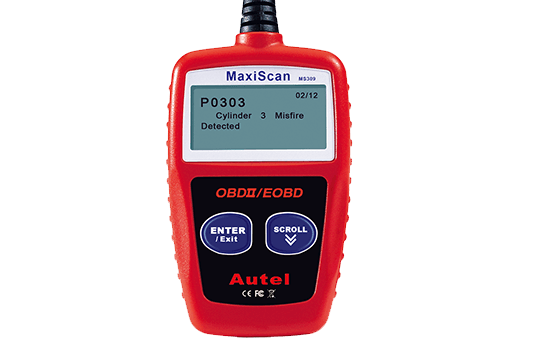
Credit: www.autel.com
Set a clear purpose for the first scan
Decide whether you are investigating an illuminated malfunction light, checking the status after a repair or simply confirming communication. Those tasks require different conclusions. Write down the vehicle year, engine and symptom before connecting. A scan without that context can produce a list of numbers that is easy to misinterpret.
Identify the model printed on the reader
Check the casing and documentation for MS309 rather than relying on an online seller's generic scanner description. Similar-looking handhelds may offer different functions. Use the manual supplied for the actual unit, including its safety instructions. Do not download firmware or operating directions intended for another Autel model.
Park and prepare before plugging in
Secure the vehicle in Park or the appropriate parked state, apply the parking brake and follow the manual's connection sequence. Keep the cable away from pedals. A reading session should not require driving while handling the reader. If the engine must run for a separate check, provide appropriate ventilation.
Use the displayed choices deliberately
Read the full selection before confirming it. A button that advances through a list can move from a read function to an erase function, so do not press by habit. If you are unsure of a screen, stop and compare it with the correct manual. Record the message rather than guessing its meaning.
Copy the code and its status together
Save the complete letter-and-number code, not only its brief English description. Include whether it is stored or pending and which module supplied it if the reader identifies that. Two screens with similar descriptions may refer to different conditions. A photograph can preserve punctuation and suffixes that are otherwise lost in handwritten notes.
Leave clearing for an informed repair step
An erase operation can remove information useful to diagnosis and reset emissions-monitor readiness. It is not routine preparation for a scan. If someone else will investigate the car, preserve the initial results. Ask what was repaired and why clearing is needed before authorizing it as part of a service procedure.
Use a dated record rather than repeated resets
For an intermittent complaint, keep the date, mileage, weather and conditions when it occurred. Compare later scans with the original record without clearing between every reading. A disappearing lamp does not necessarily mean all stored information is gone. The history of the complaint can be more valuable than one isolated code screen.
Do not substitute a testimonial for diagnosis
This article does not claim a personal workshop trial or a repair result for your vehicle. The method is to use the documented tool functions and preserve their output. When another owner reports fixing the same code with a part, treat that as a different case until vehicle-specific testing supports the same cause.
Know the documented MS309 feature set
The Autel: MaxiScan MS309 capabilities describes code reading, freeze-frame viewing, readiness status and vehicle identification among the unit's functions. That scope is useful for a first emissions-related report. It does not justify assuming full ABS, airbag, coding or bidirectional testing merely because the connector fits the diagnostic socket.
Read functions answer narrow questions
A code screen answers what condition the controller recorded. A freeze frame shows a stored operating snapshot. A readiness screen indicates whether supported monitors have completed their checks. Keep those purposes separate: a ready monitor is not a certificate that the whole vehicle is fault-free, and a code count is not a repair estimate.
Do not infer advanced access from the brand
Autel sells tools with different capabilities. Instructions for a higher-range tablet do not establish what the MS309 can do. If your job involves a safety-system warning, service adaptation or a manufacturer-specific module, confirm exact coverage before choosing a tool. The right next step may be a different scan tool or professional diagnosis.
Confirm the diagnostic socket before connecting
Use the vehicle documentation to locate its diagnostic connector. Make sure the socket is accessible and the reader's plug is undamaged. Do not force a mismatched connector or insert probes into terminals to make the tool power up. An aftermarket extension or other device already attached should be identified before proceeding.
Inspect without dismantling the socket
Look for obvious damaged plastic, foreign material or a loose mounting from a safe position. If a terminal appears bent or the socket moves into the dashboard, stop and have that condition assessed. A connection problem is not a reason to improvise a jumper. Avoid pulling on nearby wiring while reaching for the connector.
Separate power from successful communication
A lit display tells you the reader has power; it does not prove that it has established a diagnostic conversation. Follow the requested ignition state and wait for the connection result. If linking fails, record the exact message and vehicle details. Do not treat a failed connection as evidence that the engine computer is defective.
Work through every reported code
If the reader reports more than one result, capture the complete list before interpreting the first item. The order shown is not automatically a parts-replacement priority. Related codes can share an underlying cause, while others may reflect an earlier event. Give the complete report to the person investigating the complaint.
Use definitions as starting points
A description mentioning an oxygen sensor, for example, can refer to a circuit or performance condition rather than a proven bad sensor. The repair path comes from the applicable service information and tests. Avoid buying a component simply because its name appears on the small screen. A code identifies the branch of diagnosis, not its conclusion.
Understand what an erase result means
A successful command means the controller accepted the requested clearing operation where supported. It does not mean the defect was repaired or that the malfunction light will stay off. Some information has different retention rules. California BAR: OBD test reference and permanent codes explains that permanent emissions codes cannot be erased by an ordinary scan-tool clearing command or battery disconnection.
Keep performance claims within the available data
Do not turn a basic code-reader session into an unsupported horsepower, economy or engine-health assessment. A vehicle may have a drivability complaint without a stored code. Conversely, a stored code can exist while the car appears normal. Record the actual complaint and ask which further measurement would help distinguish possible causes.
Do not assume a continuous live-data display
The documented MS309 function list should be checked before expecting scrolling sensor graphs or a configurable live dashboard. Freeze-frame viewing is not the same as streaming live parameters. If the task requires watching a value change, choose equipment that explicitly supports that function rather than interpreting a stored snapshot as current behavior.
Read the freeze frame as a past event
A freeze-frame value belongs to the operating conditions recorded for the associated fault. Note the engine speed, temperature, load or other available fields together, including units. A cold-engine snapshot should not be compared casually with a warm-idle specification. The snapshot may help reproduce a complaint safely in a workshop, but it is not a complete trip log.
Make the first report reproducible
Use a simple page with the vehicle identity, reader model, code status and scan date. Add whether the engine was stopped or running. Attach clear photographs rather than transcribing only the description. This creates a useful baseline for the next scan and reduces disagreement over what the tool actually displayed.
Verify support before seeking an update
Do not assume every compact reader accepts downloadable firmware or that an update is required for each vehicle. Check the exact product's support material. Use only the manufacturer's documented process if an update is offered. A random executable labeled MS309 software is not a justified troubleshooting step for a connection error.
Distinguish unsupported from failed
A function absent from the menu is different from a supported function returning an error. Write down which occurred. Missing vehicle information or an unavailable snapshot can have several explanations and should be described accurately.
Avoid rewriting such a result as a failed component test. The tool can only report information the vehicle and its own software make available.
Troubleshoot one connection condition at a time
Begin with the correct model, compatible vehicle, intact plug and required ignition state. If the manual permits reconnecting, follow its shutdown and reconnection sequence. Change one condition at a time so the result remains interpretable. Repeated rapid key cycling and random menu selections make an intermittent problem harder to describe.
Stop when a physical problem is apparent
A damaged cable, hot connector or unstable socket deserves attention before another attempt. Do not hold a connector at an angle to maintain contact during driving. If a supply fuse is suspected, use the vehicle's documented circuit and rating through proper service practice. Bridging a fuse or diagnostic terminal is not a scanner fix.
Do not turn a code lookup into a repair order
Generic online descriptions can omit the manufacturer's enabling conditions and test sequence. Verify the code for the actual vehicle before interpreting it. If the reader's translation seems odd, preserve the original code string and ask for clarification. Replacing several named parts at once destroys the opportunity to determine which finding mattered.

Credit: www.youtube.com
Finish and store the reader properly
End the diagnostic session and disconnect in the order specified by the tool and vehicle instructions. Pull the plug housing rather than the cable. Check that no cable or adapter remains near the pedals. Keep the reader dry and protected from impact so the next session does not begin with equipment damage.
Keep the report with the service history
Store the initial code record alongside the repair invoice and any later check. Mark which results were taken before and after a repair.
If the code returns, that timeline gives the technician something concrete to compare. It is more useful than saying the reader cleared the light once and therefore the repair must have worked.
Check the equipment before each use
Look at the cable strain relief, connector and display for damage. Use the manual's cleaning method rather than spraying solvent into the plug.
Confirm that the device belongs to the same model whose instructions you saved.
A borrowed reader may look familiar but have different controls.
Keep the manual available so a menu question does not become an accidental erase operation.
Use the MS309 as one part of a diagnosis
The reader can help you describe a problem and preserve evidence, but it does not replace inspections or measurements required by the vehicle's service procedure. Ask the repairer which findings support the proposed work. A useful result from a small scanner is a better question, not a guaranteed component diagnosis.
Combine records without mixing their meanings
If a workshop later performs a full-module scan, retain both reports with their dates. The broader tool may show information the MS309 never accessed. That difference does not automatically make the earlier reader inaccurate. It may simply reflect different coverage. Compare like-for-like data before drawing conclusions about an intermittent fault.
Choose the next tool for a defined need
If you require a particular module, live graph or service function, verify that capability against the exact vehicle before borrowing or buying another scanner. Avoid upgrading solely because a display looks more elaborate. The desired test should determine the equipment. For general output interpretation, see how to read a scanner report.

Credit: www.youtube.com
A useful MS309 session preserves evidence
Leave with the complete code list, available freeze frame, readiness information and a description of the original symptom. Keep clearing separate from reading.
If the vehicle has a serious warning or cannot be operated normally, follow its safety instructions and arrange diagnosis rather than using a cleared light as reassurance.


Automotive reference information. Confirm specifications in the manual for your exact vehicle. Original replacement guides link to their research sources. About us


