
An OBD2 scanner can read ABS codes only when it supports the vehicle's anti-lock brake controller and the required diagnostic function. A basic emissions reader may read engine codes while being unable to access ABS at all.
The common diagnostic socket does not make those capabilities interchangeable. Before using a tool to investigate an ABS warning, confirm coverage for the exact vehicle and save a read-only module report.
Reading codes is also different from commanding an ABS pump, performing an automated bleed or carrying out a calibration; support for one function does not establish support or suitability for another.
Why generic OBD2 is not enough
Standard emissions communication and manufacturer brake-system access answer different questions. A reader can successfully identify an engine fault and still report nothing about ABS because that module is outside its coverage.
Do not interpret no engine codes as a brake-system result. The report must identify the controller that was actually reached and show that the requested read completed.
The connector is shared, the functions are not
Many tools use the same physical diagnostic connector, but their software and vehicle-network access differ. Product wording such as CAN compatible describes only part of the picture.
You still need documented ABS coverage for the identified model, year and market, together with the particular reading function you intend to use.
Separate three capability questions
Ask whether the tool can communicate with ABS, whether it can retrieve its diagnostic codes and whether it supports any other required function. These are not automatically one package.
Keep code reading, live wheel-speed information and active service operations separate.
A seller's broad all-system claim should be checked against the exact vehicle and function rather than accepted as a universal guarantee.
What an ABS code actually reports
A brake controller code describes a condition detected by that system. It may direct attention toward a circuit, signal or other monitored relationship, but it is not an independent component test. Use the complete code and vehicle-specific diagnostic information before deciding whether a sensor, wiring issue or another cause needs investigation.
Preserve the module name and status
Save the controller identity, full code, any subcode and status label. A shortened description can omit an important distinction, especially when several conditions mention the same wheel or circuit. Keep the warning-lamp behaviour and symptom timeline with the report so the diagnostic context is not lost.
Do not diagnose from the lamp alone
An ABS warning indicates the need to follow the vehicle's instructions, but the lamp alone does not identify the failed part. A red brake warning, abnormal pedal, fluid leak or other braking symptom changes the immediate response. Do not assume normal braking is available or that continued driving is appropriate without the guidance for the actual vehicle and symptoms.
Confirm coverage before purchasing or borrowing
Give the tool manufacturer or provider the exact vehicle details and ask specifically for ABS DTC reading. Check whether additional software or hardware is required. Keep a copy of the coverage information used to make the decision. A tool being popular for engine diagnosis does not establish that it can read your brake controller.
Handheld and phone-based tools can both vary
The device format is not the deciding factor. Some handheld readers are engine-only, while some phone systems offer enhanced module access; the reverse can also be true.
Compare documented capabilities rather than assuming that a large screen means professional coverage or that a wireless adapter is limited to generic engine data.
Use manufacturer documentation as evidence
OBDLink’s diagnostic guide describes enhanced manufacturer access separately from standard OBD2 and notes vehicle and adapter limitations.
That is the kind of information needed to assess a proposed combination.
Do not transfer one product's coverage to another device simply because both use a similar app interface or advertise Bluetooth connectivity.
Start with a read-only session
Follow the tool and vehicle instructions for connection and ignition state while parked. Select the correctly identified vehicle and the supported ABS code-reading function. Leave output controls, bleed routines, calibrations and other service commands alone during initial evidence collection. Their presence in a menu does not make them appropriate for the current warning.
A documented model example
Innova’s 5610 ABS guide shows a dedicated ABS read operation and distinguishes unsupported functionality from a completed code result. Its menu path belongs to that tool and documentation revision.
Use it as an example of explicit instructions, not as a universal button sequence for every scanner sold by the same manufacturer.
Interpret the result by its actual meaning
Codes retrieved, no stored codes after successful communication, unsupported function and communication failure are different outcomes. Record which one occurred.
An unsupported or failed scan cannot reassure you that the brake controller is fault-free. Even a completed no-code report must be considered alongside a continuing warning or physical braking symptom.
Use the report to select the next check
A complete ABS report can narrow the investigation and help a technician choose the relevant service procedure. It can also expose the need for more capable equipment. Its value is not that it instantly names a replacement part, but that it makes the next diagnostic decision more specific and reviewable.
A scan does not replace physical brake inspection
Electronic diagnostics cannot independently establish pad condition, hydraulic integrity or every mechanical problem. A vehicle can have a braking concern without a useful ABS code. Describe pedal feel, noise, leakage or other observations separately and have them assessed through the appropriate inspection rather than expecting the code list to answer everything.
Avoid replacing a wheel sensor on wording alone
A description naming a wheel-speed circuit is not sufficient proof that the sensor itself failed. The matching diagnostic procedure may require distinguishing signal, connection and other causes. Ask what test confirms the proposed repair. This avoids spending money on the most obvious named part while the real condition remains.

Credit: www.harborfreight.com
Match the tool to the actual job
If the immediate need is preserving a code report, verified read-only coverage may be enough. If a later repair requires a service operation, verify that operation separately using the vehicle procedure. Do not buy a tool around an advertised bleed feature before confirming that the repair actually calls for it and that the application is supported.
Useful reporting features
Look for clear module identification, complete code text, status and an export you can retain. Those features make a limited scan more useful than a screen that displays only a vague repair suggestion. Check whether the report includes a date and vehicle identification so it can be compared with a later post-repair result.
Why there is no universal best-reader answer
Coverage depends on vehicle configuration, software and the specific operation. A recommendation suitable for one ABS module may fail on another. Request explicit confirmation from the manufacturer or choose a professional service with appropriate equipment. The key is a verified match, not a brand ranking that hides application limits.
If the scan does not reach ABS
Confirm the selected profile and documented ignition state, then follow the tool's connection troubleshooting. Avoid changing unrelated settings or repeatedly clearing engine codes. Record the exact error and what did communicate successfully. That evidence helps distinguish a coverage problem from a vehicle communication problem without guessing that the ABS module is damaged.
Do not bridge pins to force access
The diagnostic connector should be used with the correct interface and documented procedure. An unsupported reader is not a reason to improvise a jumper or apply power to terminals. If normal supported access fails, obtain qualified diagnosis or manufacturer support rather than turning a communication limitation into an electrical experiment.
When descriptions or data seem wrong
Check vehicle identity, module selection and whether the screen is a saved report. Confirm units and parameter definitions for any displayed data. A missing description is a limitation of the tool's database, so retain the full code and consult the proper reference rather than selecting a similar-sounding result from another model.

Credit: www.amazon.com
Keep active brake functions outside casual testing
Commands that operate pumps or valves can affect the system and require vehicle-specific preparation. Do not select them merely to hear whether something runs. Likewise, reading ABS codes does not require opening hydraulic lines or initiating a bleed procedure. Those tasks belong to a diagnosed repair and its prescribed service process.
After a repair, verify the original concern
Retain the before-repair report and save the follow-up separately. Ask which fault was confirmed, what was repaired and how the vehicle's required checks were completed.
A receipt stating codes cleared is not equivalent to explaining why the original warning occurred or demonstrating that the specified verification passed.
A broader scan may provide context
Related controller reports can help a qualified technician understand a network or shared-system concern, but more codes do not automatically mean more failed parts. Keep each report attached to its module and timing.
The diagnostic sequence should distinguish primary and secondary evidence rather than treating every entry as an independent replacement instruction.
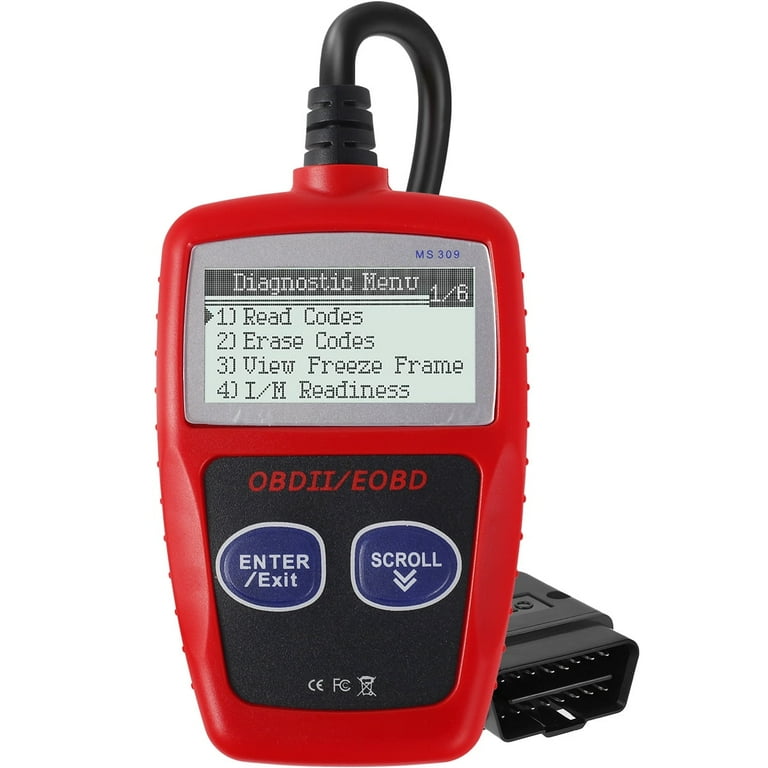
Credit: www.walmart.com
The answer is exact ABS coverage
Use a scanner only after confirming that it can read the identified vehicle's ABS controller, then preserve the complete report. Treat unsupported access honestly and keep reading separate from active service commands.
For general report terminology, see the OBD2 report guide; for any braking symptoms, follow the vehicle's warning instructions and obtain the required inspection.


Automotive reference information. Confirm specifications in the manual for your exact vehicle. Original replacement guides link to their research sources. About us


