
Yes, many supported OBD2 data-reading functions can be used while the engine runs. That does not mean every scan operation requires a running engine or that every tool should be plugged in while it is running. Reading data, physically connecting equipment and sending a command are separate actions with potentially different instructions. The correct sequence comes from the exact scanner manual and the vehicle procedure. Use a running engine only when the intended observation or documented test calls for it.
A stored-code check may be possible with the ignition on and engine stopped, while watching an actual warm-up requires the engine to operate. Clearing codes is a different task again and often specifies an engine-off condition. Do not translate a general yes into permission to explore every menu. Before starting, identify the question you want the scanner to answer.
If the car has a serious warning or unsafe behavior, follow the vehicle manual rather than running it simply to collect data. For routine observations, park in a suitable outdoor location, secure the vehicle and prevent the cable or phone from interfering with controls. A reader is useful when it gathers relevant evidence under controlled conditions. It is much less useful when the operator changes engine state repeatedly without recording what was being measured.

Credit: www.autonationmobileservice.com
Choose the operating state for the task and the equipment
Two abbreviations often appear in scan-tool instructions: KOEO means the ignition is on while the engine is stopped, and KOER means the engine is running with the ignition on. They describe test conditions, not interchangeable ways to use every function. A push-button vehicle may require a particular procedure to reach an ignition-on state without starting; use its owner's manual rather than a universal button sequence. Also distinguish accessory mode from the state that powers the controllers needed for diagnosis. A screen or radio being on does not prove that the diagnostic system is ready. On electrified vehicles, a ready-to-drive state can introduce additional movement and automatic engine-start considerations, so use the instructions specific to that vehicle and avoid assumptions based on a conventional key. The manufacturer's connection sequence matters. Innova’s general scan-tool guide discusses running-engine use for supported tools, whereas its 5010 retrieval instructions begin with ignition off before connection. The Autel IM508S manual gives its own connection precautions. These examples show why advice for one product should not become a universal plug-in rule. Identify your exact model and follow its current manual together with the vehicle instructions. If two instructions appear to conflict, obtain clarification from the manufacturer before proceeding. Do not improvise a sequence based on whichever instruction is more convenient. Keep the tool's model and document revision in your notes if you need support.
For retrieving stored information, an engine that is not running may provide everything required. You can often obtain supported fault records without creating exhaust, heat or moving-component hazards. The actual vehicle and reader determine the required ignition state. Save the full code, its reported status and any associated event information. A no-start vehicle may still communicate if the relevant systems have power and are awake; conversely, a dead or inadequate electrical supply can prevent communication. Do not keep cranking simply to satisfy a scanner screen. Record the condition and use the appropriate diagnostic path. An inability to connect does not by itself establish that the engine controller has failed. It may require checking tool coverage, operating state or the electrical system with the right equipment. Running-engine live data is appropriate when the question concerns operation that cannot occur with the engine stopped. Examples include observing a supported temperature change during ordinary warm-up or recording related readings while a symptom is present under safe conditions. The value comes from knowing the conditions and the source of each parameter. Record units and whether the engine is cold, warming or at the specified operating condition. A zero engine-speed reading with the engine stopped can be entirely expected, while the same display during operation raises a different question about the selected data, communication or vehicle.
Do not judge a value without its context. A scanner may show calculated values, and unsupported data should not be interpreted as a real zero. Choose only the measurements needed for the comparison. A crowded display can make relationships harder to follow and may update less conveniently than a focused group. If a symptom occurs intermittently, a supported recording feature can preserve the relevant period, but it does not eliminate the need for safe operation. The driver must not manipulate a handheld reader or phone while the vehicle moves. Do not arrange a road test around a severe misfire, overheating, unsafe shifting or another condition that calls for stopping. A workshop can decide whether a controlled test is necessary and how it should be performed. A graph is not worth worsening a fault or creating a distraction. Where stationary observation answers the question, there is no reason to add a driving task. Plan the physical environment before starting the engine. Exhaust must not accumulate around the occupants or work area. Keep people, clothing, tools and the diagnostic lead away from moving and hot components. Secure the parked vehicle according to its manual and do not leave it unattended during the session.
A device hanging near pedals can be a hazard even if its electrical operation is correct. Position the display so it can be read without reaching into an unsafe area. If a laptop is involved, place it on a stable surface rather than balancing it where it could fall into the controls. Stop the observation if the vehicle's condition changes or the required safety conditions cannot be maintained. Reading and commanding must remain separate decisions. A menu that displays engine speed is not equivalent to an output test, adaptation, relearn or programming operation. Those functions can require additional prerequisites, controlled conditions and professional equipment. Do not activate them merely because the engine is already running. For example, the KONNWEI KW808 manual specifies ignition on with the engine stopped for its erase function. That instruction should not be extended to every model, but it clearly shows why running permission for live data does not authorize running during code clearing. Read the exact task instructions before confirming any command. Cancel a prompt you do not understand rather than assuming it only changes the screen. The EPA’s diagnostic-check guidance also reinforces the importance of preserving fault information and treating the scan as part of an inspection or diagnostic process.
Clearing codes can remove useful context and alter readiness, even if the engine is currently idling smoothly. A temporary absence of symptoms is not proof that the underlying condition has been repaired. Save the original evidence, investigate the cause and follow the applicable repair-verification instructions. If a tool says a condition is not met, do not defeat that restriction by changing settings at random. Determine whether the function is unsupported, the vehicle state is wrong or the task requires a different procedure. Those distinctions are more useful than repeatedly retrying an operation. Consider a simple warm-up observation. Before starting, document the ambient circumstances and the supported parameter selected. Begin the session using the prescribed connection sequence, then observe only under safe stationary conditions. Note the progression and any warning separately. If the value behaves unexpectedly, confirm the units, sensor identity and vehicle procedure before declaring a component bad. In contrast, a request to read a stored code after an earlier warning may not need the engine to run at all. Matching engine state to the question makes both sessions more efficient and reduces misleading comparisons between values captured under different conditions.
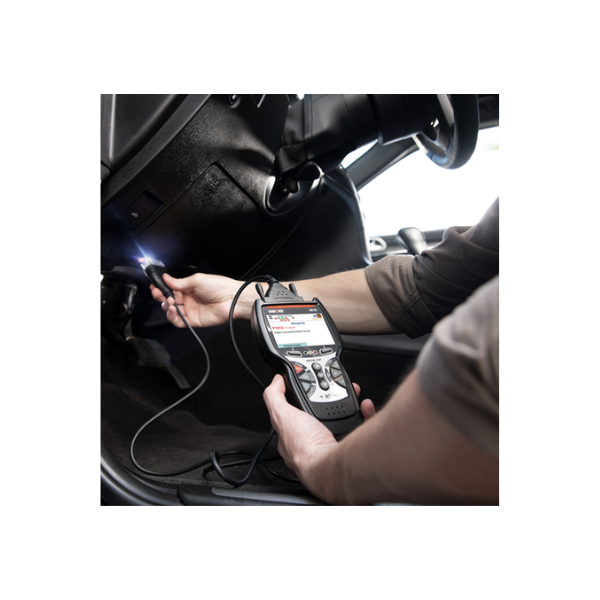
Credit: www.innova.com
Finish the session without losing its context
Save the relevant record before ending the connection. Mark the date and vehicle mileage so a later session remains distinguishable. Include the ignition or running state, the approximate stage of operation and the symptom being investigated. Follow the tool's exit procedure and the vehicle instructions before removing the connector. Do not pull on the cable while the tool is still performing a commanded operation. If the device is intended for ongoing logging, confirm that its installation and use are allowed for the vehicle and that it cannot obstruct controls. Leaving an adapter fitted is a separate decision from completing a short scan. If you share the data with a technician, describe what you did rather than presenting a graph as a diagnosis.
State whether readings were collected at idle, during warm-up or under another documented condition. Identify any unsupported values and any communication interruptions. This prevents the reviewer from assuming that the record represents a different operating state. For more on interpreting the numbers, see how to read OBD2 live data. For connection faults, see scanner power and communication checks. The key distinction is straightforward: supported reading may take place with the engine running, but the required engine state and connection order belong to the specific task, tool and vehicle. Use those instructions to plan a deliberate session rather than treating every OBD operation as the same activity.


Automotive reference information. Confirm specifications in the manual for your exact vehicle. Original replacement guides link to their research sources. About us


