On a 2019 Silverado 1500 equipped with the brake-pad life system covered by the cited owner’s manual, reset the serviced axle after the pads are replaced. If the display instead reports a Service Brake Pad Monitor fault, establish the cause rather than assuming that a normal menu reset repairs it.
First identify the truck and manual:2019 Silverado branding covers configurations that should not be treated interchangeably. The instructions below are scoped to the 2019 Silverado 1500 manual cited here, not every HD truck or older-body configuration.

Credit: www.reddit.com
Before resetting the maintenance record
Confirm which axle received new pads and that the brake repair, required sensors and post-service checks are complete. Do not set worn pads back to a new-pad value to remove an inconvenient message. That makes the remaining-life record misleading.
Record the exact message before doing anything. A replacement reminder, an estimated percentage and a monitor-system service warning are different information. If braking is abnormal, fluid is leaking or a red brake warning is present, address the brake condition before working through a display menu.
The owner-manual reset route
The 2019 Silverado 1500 manual, pages 336–337 describes an automatic prompt after significantly worn pads and sensors are replaced. Follow that prompt when it appears and the repair is complete.
For its manual route, open Brake Pad Life in the Driver Information Center. Use the thumbwheel, or the trip-odometer reset stem on a vehicle without the DIC buttons, to choose the front or rear pads. Confirm the reset using the displayed YES option or the base-display stem as specified. Repeat for the other axle only if that axle was also serviced.
Make sure you selected the correct item
The driver display contains other maintenance information, so check that you are changing the brake-pad entry rather than an oil-life or air-filter entry. Confirm the serviced axle before accepting the change. A reset of the wrong item does not correct the brake record.
If the menu is unavailable, the prompt is absent or the reset is refused, stop improvising button combinations. Note what the screen actually shows and return to the applicable diagnostic or service information. Disconnecting the battery is not a reliable substitute for the required repair and reset procedure.
Why a service message may need more than a reset
GM bulletin PIT5695B documents a pad-life calculation and monitor-message concern on specified 2019 new-model Silverado 1500 and Sierra1500 vehicles, including particular fault-code conditions. It describes a software and diagnostic response within a defined application range.
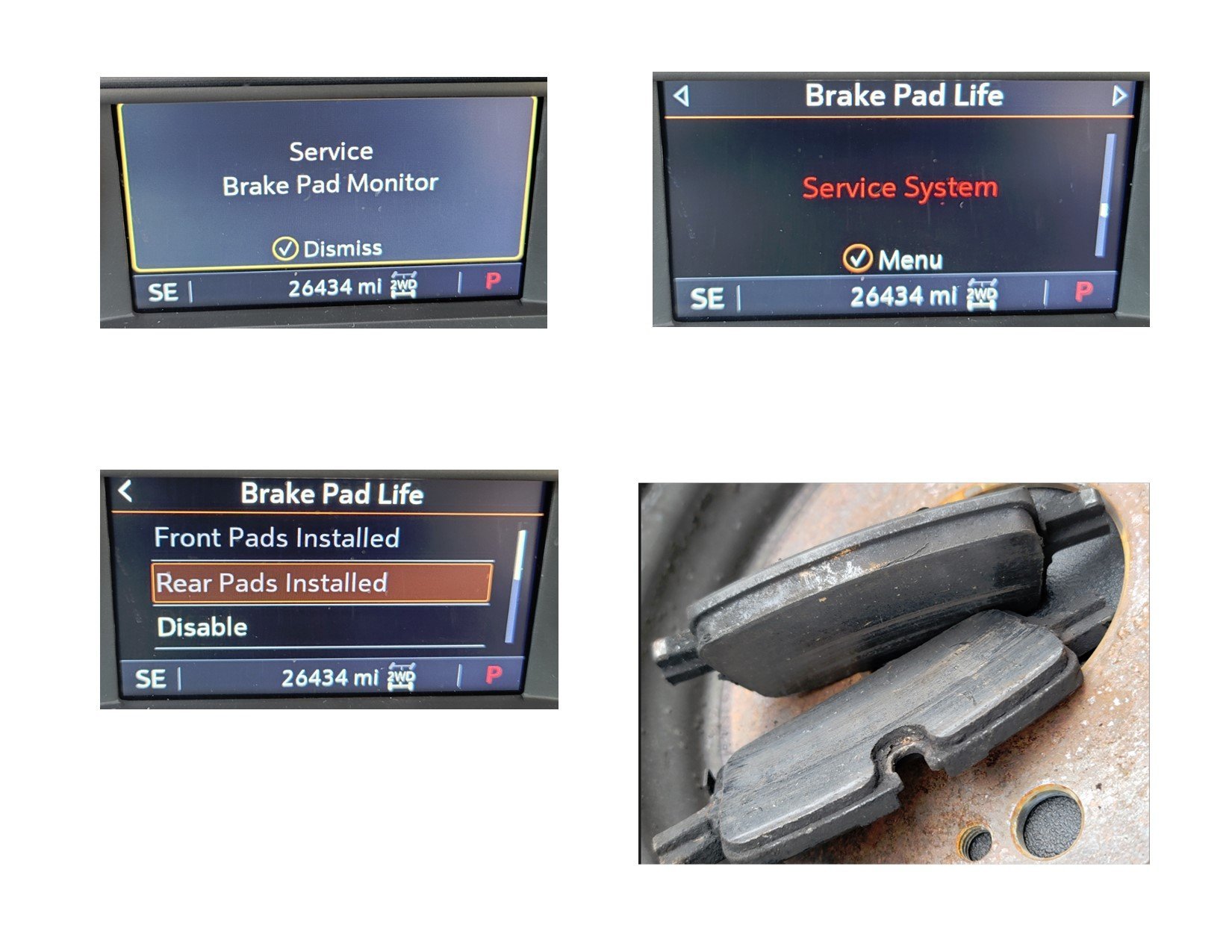
Credit: www.gm-trucks.com
That historical bulletin does not prove your truck has the same fault, nor does it mean every2019 truck needs programming. Its practical lesson is that an unexpectedly low reading or service message can require checking actual pad condition, fault information and current calibration guidance. A shop must confirm applicability and current instructions.
Questions for a truck that was just serviced
Ask which axle was repaired, whether the correct monitoring components were installed or checked, and whether the reset completed successfully. If a fault persists, request its code and diagnostic finding rather than another unexplained reset.
Do not assume the new pads are defective solely because the display will not reset. Conversely, do not ignore the warning because the pads are new. Wiring, components, procedure and the monitored system must be assessed as a whole.
Keep the reset separate from disabling the feature

Credit: www.reddit.com
Removing or disabling a monitoring feature is not the same as restoring its operation after service. Do not treat that as the default solution to an unresolved warning. Preserve the intended warning function and follow the applicable documentation for the equipment fitted.
For the general difference between a service message and a wear estimate, see what Service Brake Pad Monitor means. This page adds the specific 2019 manual route; the broader guide explains the diagnostic distinction.


Automotive reference information. Confirm specifications in the manual for your exact vehicle. Original replacement guides link to their research sources. About us