
To use a U480 CAN OBD2 reader responsibly, first match the unit in your hand to its supplied manual, then read and preserve the diagnostic results before considering erasure. The U480 name appears on products sold through different channels, so a label alone does not justify assuming identical firmware, controls or coverage. The reference used here is an archived Memoscan U480 operating manual hosted by Carmod, not a claim that the host is the current manufacturer or that every U480-branded unit follows it. If your device or instructions differ, obtain the correct document from its seller or maker.
The main owner task is a basic supported emissions-code read. Do not assume that the words CAN or OBD2 mean the device can diagnose every vehicle module, display every live parameter or perform modern service functions. A simple reader can still be useful if its limitations are understood. Before connecting, note the vehicle details, the dashboard warning and the conditions when the symptom occurred.
Follow the vehicle manual for any urgent warning or unsafe operation. The reader cannot establish that it is safe to drive a car with a serious symptom, and a blank code screen should not override that symptom. Plan to leave the session with a precise record and an appropriate next step rather than simply a cleared light.
Credit: www.youtube.com
Use the documented controls without assuming extra capabilities
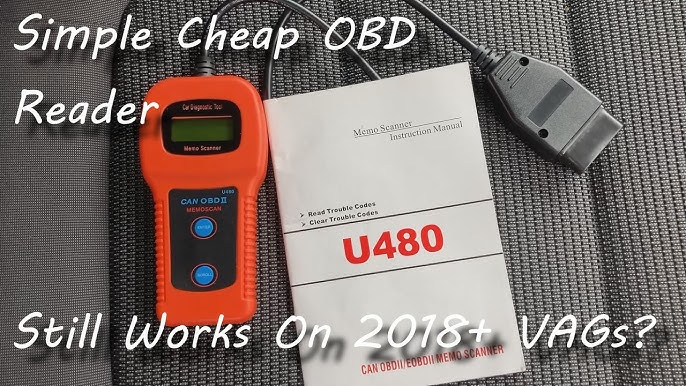
In the referenced Memoscan manual, the read sequence starts with ignition off for connection, then ignition on without starting the engine. ENTER begins communication detection, and the DTC menu provides retrieved records; SCROLL moves through them. The document identifies pending entries separately and includes readiness, VIN and rescan functions. Follow the matching manual's exact prompts rather than using a button sequence from a different version. The small display makes careful transcription important. Record every character of the code and any status indicator, not just the number of faults shown in the summary. Do not treat a total count as an explanation of what failed. A report containing several records may need vehicle-specific interpretation before the relationship among them is clear. Begin with compatibility, not repeated retries.
Identify the year, model, engine and original market of the vehicle. A connector's shape and the fact that the device lights up do not prove support for the desired diagnostic system. OBDLink’s compatibility information illustrates how emissions requirements and supported access differ by market and application; the seller or maker of your U480 must still confirm its own coverage. Avoid broad assumptions such as every vehicle built after one global date is fully supported. Older vehicles, imports and nonstandard applications can require a different tool. If the intended task is ABS, airbag, key programming or a manufacturer-specific service function, obtain explicit coverage confirmation instead of inferring it from the presence of a CAN label. Inspect the plug and socket before seating the connector. Do not force a plug that is misaligned or damaged, and do not insert metal objects into contacts as a casual power check. Keep the cable away from pedals and other controls.
If the reader remains blank or shows a link error, preserve the exact symptom. A power problem and a protocol connection problem require different checks. Follow the documented retry process for your unit, then stop if it does not communicate. Repeated random attempts do not provide a diagnosis of the vehicle computer. Provide support with the model, vehicle details, ignition state and screen wording. If electrical checks are necessary, they should follow the vehicle wiring information and be performed with appropriate equipment. Once records are retrieved, distinguish the electronic finding from your interpretation. A code is not a purchase order for the component whose name appears in a definition. The EPA’s OBD guidance describes an emissions-monitoring system that records detected conditions.
A technician may need to test wiring, operation or mechanical relationships to establish the cause. Look up the complete code with the correct vehicle information rather than selecting the first generic explanation found online. Manufacturer-specific definitions can matter, and a short printed code list may not cover the vehicle's full context. If the reader does not display a description, retain the code exactly and obtain the appropriate definition elsewhere. Do not fill in missing characters from memory. A small-screen tool benefits from a deliberate recording routine. Write the vehicle name and date at the top of the notes, then capture each record with its status. If taking photographs, make sure the code and sequence information are legible. Review the complete list before leaving the menu so an entry is not missed between screens.
Add observations such as when the light appeared and whether the vehicle was running differently. Keep those observations separate from the code record. A rough idle described by the driver and a code returned by the controller are two pieces of evidence; the scanner has not automatically established the cause connecting them. This distinction helps a workshop use the report without having to undo an unsupported diagnosis first. Readiness should be reviewed as its own result. In the referenced manual, the summary combines monitor completion and warning status, so a summary response should not be interpreted as a universal inspection verdict. Read the individual monitor information where supported. Texas DPS explains the difference between incomplete and unsupported monitors and why clearing or recent electrical events can affect readiness.
An incomplete monitor means the relevant check has not completed under the necessary conditions; it does not automatically identify a failed part. An unsupported monitor is different again. Inspection requirements depend on the jurisdiction and vehicle, so check the applicable rules instead of trying to force the reader's summary into a pass-or-fail promise. Treat an erase selection as a change to vehicle information, not as a harmless menu option. The manual warns that clearing affects diagnostic evidence and readiness. Save what you need before any authorized post-repair clearing. Do not use an erase shortcut simply because it is convenient, and do not clear a warning to hide a problem before inspection or sale. A successful erase message means that a command was accepted under the supported conditions; it does not establish that the mechanical or electrical cause has been repaired.
If the warning returns, preserve the new record and compare it with the earlier one. Repeated deletion can make an intermittent problem harder to investigate. If a permanent diagnostic record is relevant, use a tool and procedure that actually identify that record type rather than assuming an older reader's display covers it. Do not invent capabilities absent from the matching documentation. The referenced U480 workflow is centered on codes and related emissions information. It is not evidence of comprehensive graphing, all-system coverage or a firmware path to newer functions. If a task needs a measurement that your unit does not provide, choose a supported tool or service instead of treating a code description as that measurement. Likewise, a rescan obtains another available record; it is not a physical test of a component.
A VIN function, where supported, can help identify the session, but failure to retrieve it does not by itself diagnose a vehicle fault. Keep the distinction between unavailable information and an actual abnormal result. Consider a common first-use situation: the car has a warning, the U480 retrieves one pending record and the owner wants to clear it immediately. A more useful sequence is to preserve the code and symptom, check the correct definition and decide whether the condition needs prompt professional assessment. If the vehicle behaves normally, that still does not make erasure the necessary next step. If the vehicle behaves dangerously, the urgency comes from the symptom and manufacturer guidance, not from whether the small screen labels the record pending. Another situation is a readiness summary that changes after battery work. Investigating the recent event and the individual monitor states is more informative than buying parts solely because the summary is not affirmative.

Credit: www.amazon.com
Keep the reader within its documented role
When the session is complete, follow the matching exit and disconnection instructions and store the reader where the connector and cable will not be damaged. Retain the manual with the unit so a future user can identify the correct controls. If the device was bought without reliable documentation, obtaining that documentation is part of making it usable; guessing at erase shortcuts is not a substitute. For a repair discussion, provide the recorded codes, statuses, symptoms and tool limitations. The FTC’s repair guidance supports asking how a proposed test or repair follows from the available evidence. An older basic reader can be a useful information source without being the final diagnostic authority.
If the next question needs broader access, arrange it explicitly. The code-clearing guide explains why preserving records comes first. The readiness explanation helps interpret an incomplete status without treating it as a failed component. A careful U480 session should establish what this particular reader retrieved from this particular vehicle. Keeping that statement narrow makes the result more trustworthy and avoids turning a modest code reader into an unsupported promise of complete diagnosis.


Automotive reference information. Confirm specifications in the manual for your exact vehicle. Original replacement guides link to their research sources. About us


