
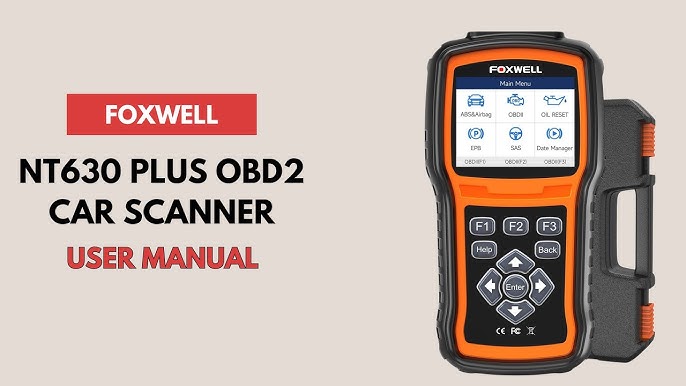
Foxwell sells several kinds of diagnostic equipment, so the first step is identifying the exact model. This guide uses the NT301 OBDII/EOBD reader as its example. It should not be treated as an operating manual for a Foxwell tablet, an NT530 with manufacturer software or a TPMS tool. The controls, coverage and service functions can differ substantially. Find the model on the housing and compare it with the official NT301 product page and its linked documentation.
For an NT301, the useful first session is a read-and-record session: establish communication, preserve the existing diagnostic information and decide what further testing is justified. Clearing the warning should not be the opening step. A dashboard light, a stored code and an incomplete readiness monitor are different findings, even when they appear on the same tool. Park securely and consult the vehicle manual if the warning is accompanied by an urgent symptom.
Do not use a scanner session to postpone action on overheating, severe misfiring or loss of safe operation. Arrange ventilation for any running-engine observation and keep the cable away from the driver's controls. The tool can help organize evidence, but it does not replace the vehicle-specific repair procedure. Its most useful result is a record that connects a code or measurement with the operating conditions when you obtained it.
Credit: www.youtube.com
Read, preserve and interpret NT301 information in order
Use the NT301 English user guide for the actual connection and button sequence. It describes vehicle-powered connection at the diagnostic socket, ignition on and selection of Diagnostics, followed by automatic communication detection. Read Codes provides supported stored, pending and permanent records. The manual also distinguishes Review Data from vehicle communication and provides a separate PC workflow for printing and updating. Those distinctions matter: USB work on a computer is not an alternative way to power the reader during vehicle communication, which the manual expressly warns against. Follow the supplied revision if your device differs from the documented version. Do not copy a tutorial for another Foxwell model merely because the case looks similar. Before selecting a test, write down the year, model, engine and warning. Include recent battery replacement, code clearing or repairs.
Inspect the plug and socket for obvious damage without probing the contacts. Seat the connector normally; unexpected resistance is a reason to stop and check alignment. If the reader powers up but cannot establish communication, record the message and verify vehicle compatibility and ignition state before blaming a controller. A screen turning on proves less than a completed diagnostic connection. If the reader identifies more than one responding module, retain the module identity with each result. A code taken out of that context can be misunderstood later. Do not repeatedly unplug the reader while it is communicating as a way to force it to work. End the session using the appropriate instructions before retrying. Start by saving the full code information and relevant event data.
The same short fault description can be interpreted too broadly when separated from its status. A pending record and a confirmed record should not be silently combined into one list of failed parts. Preserve the exact characters, the status shown and the module name if supplied. Take a clear photograph or use the documented saved-data workflow, making sure that a new session does not overwrite information you still need. Distinguish a prompt about replacing the reader's saved report from a command to erase diagnostic information in the vehicle. If the wording is unclear, cancel and consult the manual. That pause can prevent the loss of evidence before anyone has investigated the cause. A code description is a starting point for diagnosis. It can identify a monitored condition or circuit without establishing why that condition occurred.
The EPA’s explanation of OBD checks places those records in their emissions-monitoring context. A named sensor may be reporting a real engine condition rather than failing itself. Likewise, a circuit-related record may call for electrical checks rather than immediate replacement of the component mentioned on screen. Use the code with the vehicle manufacturer's diagnostic information. If you lack the equipment or experience for the required check, give the saved report to a qualified repairer. A reader does not supply the physical evidence that a wiring inspection, pressure measurement or mechanical test would provide. Next decide whether freeze-frame or live data answers a specific question. Freeze-frame information is a stored view associated with an event; live data is what the tool is retrieving during the current session.
Mixing them can create a false comparison. Label each screenshot accordingly. For live readings, retain units, engine state and relevant conditions. A coolant-temperature value after an overnight rest should not be compared casually with a fully warm value as though one must be faulty. Choose a small group of related readings rather than filling the display with every available parameter. That makes changes easier to follow and reduces the temptation to invent a diagnosis from one fluctuating number. Some information may be unavailable on a particular vehicle, and an unsupported item is not a measured zero. Read the status text rather than assuming every blank is a defect.
The NT301's readiness display deserves its own review. Readiness concerns whether supported emissions monitors have completed their checks under the conditions required by the vehicle. It is not a general certificate that the brakes, steering or transmission are sound. Texas DPS readiness guidance explains why an incomplete monitor can follow clearing or battery-related events and why a relevant drive cycle may be needed. Do not alter a reader setting to make an incomplete result look acceptable. Tool display preferences cannot change what the vehicle has actually completed. Inspection rules also vary by jurisdiction and vehicle, so check the applicable program rather than treating a colored light on the reader as a guaranteed pass. Record the individual monitor results and any fault records together.
Only consider clearing after the condition has been properly assessed and the relevant repair is complete. Save the earlier report first. The NT301 manual specifies ignition on with the engine stopped for its erase operation, but the exact instructions on your supported device and vehicle still govern. Clearing is a command that changes diagnostic evidence; it is not another way of viewing it. If a permanent record remains, do not repeatedly erase or disconnect the battery in an attempt to force it away. Such records have their own vehicle-controlled verification conditions. After a repair, compare the new results with the old ones and allow the relevant monitoring process to occur as specified. If the same condition is detected again, reassess the diagnosis rather than celebrating a temporarily extinguished light.
Coverage should also limit how you interpret a successful scan. An OBDII/EOBD reader is not automatically an all-system tool. The existence of a diagnostic connector does not guarantee access to every ABS, airbag, body or transmission function. OBDLink’s compatibility guidance provides another manufacturer's useful illustration of the difference between standardized access and vehicle-specific coverage. For Foxwell equipment, obtain confirmation for the exact tool and vehicle before purchasing enhanced software or expecting a service reset. Do not select active component tests merely to explore a menu. A function that can command vehicle behavior requires its own procedure and precautions. Owner-level code reading should remain separate from operations whose consequences are not understood.
Credit: www.londondaily.news
Keep the tool useful after the first scan
When a report contains several records, preserve their original order and labels rather than rewriting them from memory. If you later annotate a possible cause, mark it as your question so nobody mistakes the note for a measured result. Maintain a small record for each session: vehicle identification, mileage, date, symptom, code status and the measurements that actually informed the next step. If the vehicle is shared, make that record accessible to the person arranging repairs. A workshop can then distinguish your observations from the tool's interpretation and decide whether another scan or test is needed. For example, a warning that appeared only after a cold start should be described that way even if your later scan occurred with a warm engine.
The later data does not recreate the earlier event. If the tool cannot retrieve the information needed, write down that limitation rather than filling the gap with an internet normal value. Preserve useful saved files before software maintenance. For updates, use Foxwell's official support route and the package for your exact model; an updater for another reader is not an upgrade to broader coverage. Check current computer compatibility before starting and follow the documented connection sequence. Keep the device dry and store the cable without sharp strain at the connector.
A damaged lead can turn a reliable tool into an intermittent connection problem. The live-data interpretation guide explains how to frame measurements around a diagnostic question. The code-clearing guide explains why preserving evidence matters before an erase operation. Used with those limits, the NT301 can provide an orderly picture of supported emissions information. The next decision should follow that evidence and the vehicle procedure, not the desire to make every warning disappear from the display.


Automotive reference information. Confirm specifications in the manual for your exact vehicle. Original replacement guides link to their research sources. About us


